

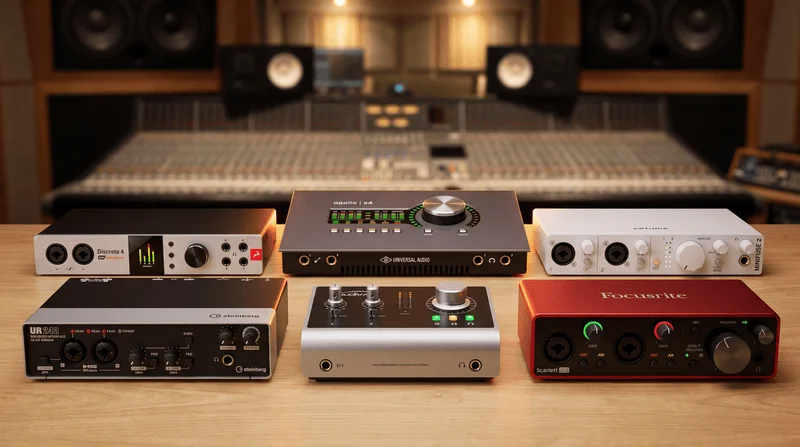
In our roundup of the best external sound cards for music, recording, and general listening in 2026, we’ve included everything from budget options under $100 to mid-tier cards up to $300, and high-end models starting at $300. Every external sound card in this list connects to your PC or laptop via USB.
The external sound cards featured in this TOP are categorized as entry-level, enthusiast, and Pro. They’re suitable for portable use with a laptop, a home studio, or a stationary PC, with some even fitting into professional studio environments.
TOP 15 Best External Sound Cards for Music – (2026):
1. Arturia AudioFuse 16Rig
Best sound card in 2026 for the studio — with 16 analog inputs, 12 outputs
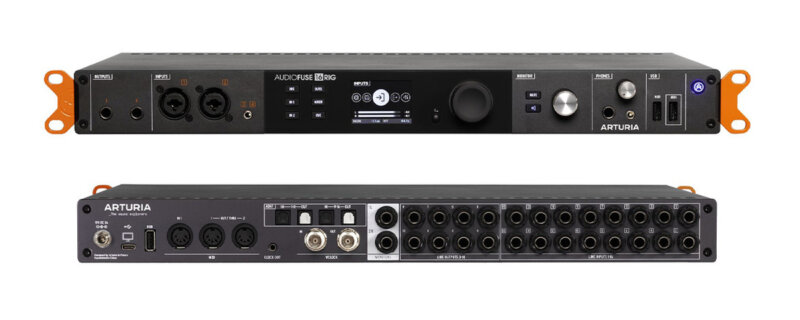
The Arturia AudioFuse 16Rig stands out as the best sound card for hybrid/synth studios in 2026. It boasts 16 line inputs, 12 analog outputs (8 of which are DC-coupled), dual ADAT, Word Clock, MIDI, and a USB hub. With two standalone mixers and matrix routing, you can keep all your hardware connected simultaneously. iXBT measurements confirm its top-tier converters, showing a 124 dB dynamic range and just 0.00013% THD.
Following its 2.0 update, the interface gained immersive monitoring/speaker management, making it a robust foundation for a control room. Its main limitations are the two built-in preamps and the lack of a hardware DSP processor, so you’ll need an external ADAT preamp for multi-microphone recording.
Recording on Arturia AudioFuse 16Rig via Audio Technica AT4040 microphone – Speech, Vocals, Guitar:
- Lots of analog I/O: 16 TRS line inputs, 12 analog outputs (8 DC-coupled).
- Two independent low-latency mixers, matrix routing, works without a PC.
- USB hub (3x) and USB-MIDI host — convenient for hardware.
- Top-tier measurements: 123.9 dBA dynamic range, -123.7 dBA noise, 0.00013% THD.
- Immersive monitoring/speaker management (update 2.0).
- Two headphone outputs (6.35 and 3.5), color display.
- AudioFuse Creative Suite plugin package included.
- Preamps with plenty of gain (~72 dB), low EIN.
- Only 2 microphone preamps — an external ADAT preamp is needed for many microphones.
- No hardware DSP for tracking (only software plugins).
- Cannot recall mixer/matrix presets via MIDI Program Change.
2. Antelope Discrete 4 Synergy Core
Best sound card in 2026 — with DSP processor and top converters

The Antelope Discrete 4 is the top external sound card for recording, composing, or mixing music. It’s equipped with high-end converters and a DSP processor for real-time use of Antelope’s premium plugins. While the Antelope Discrete 4 is an expensive sound card, it’s essential for professional work, and users who buy it know how to leverage its capabilities. It offers 4 inputs and 6 outputs, with ADAT and SPDIF available for expansion. This best-in-class sound card also features 4 headphone outputs. Build quality and aesthetics are reference-level, giving it a stylish and professional look, complemented by an LCD display showing all necessary information.
The Antelope Discrete 4 earns its spot as the best sound card in our ranking due to its converters, functionality, and DSP – all geared towards professional recording studios and producers.
- Superb converter sound quality
- Quality build and attractive design
- DSP processor and ability to run plugins inside the audio interface
- Quality plugins from Antelope
- Top-tier converters for the price
- Mac and Windows compatibility
- Some complaints about stability on Windows
3. UAD Apollo Twin Duo
Good external sound card for the studio — with DSP processor and compact size
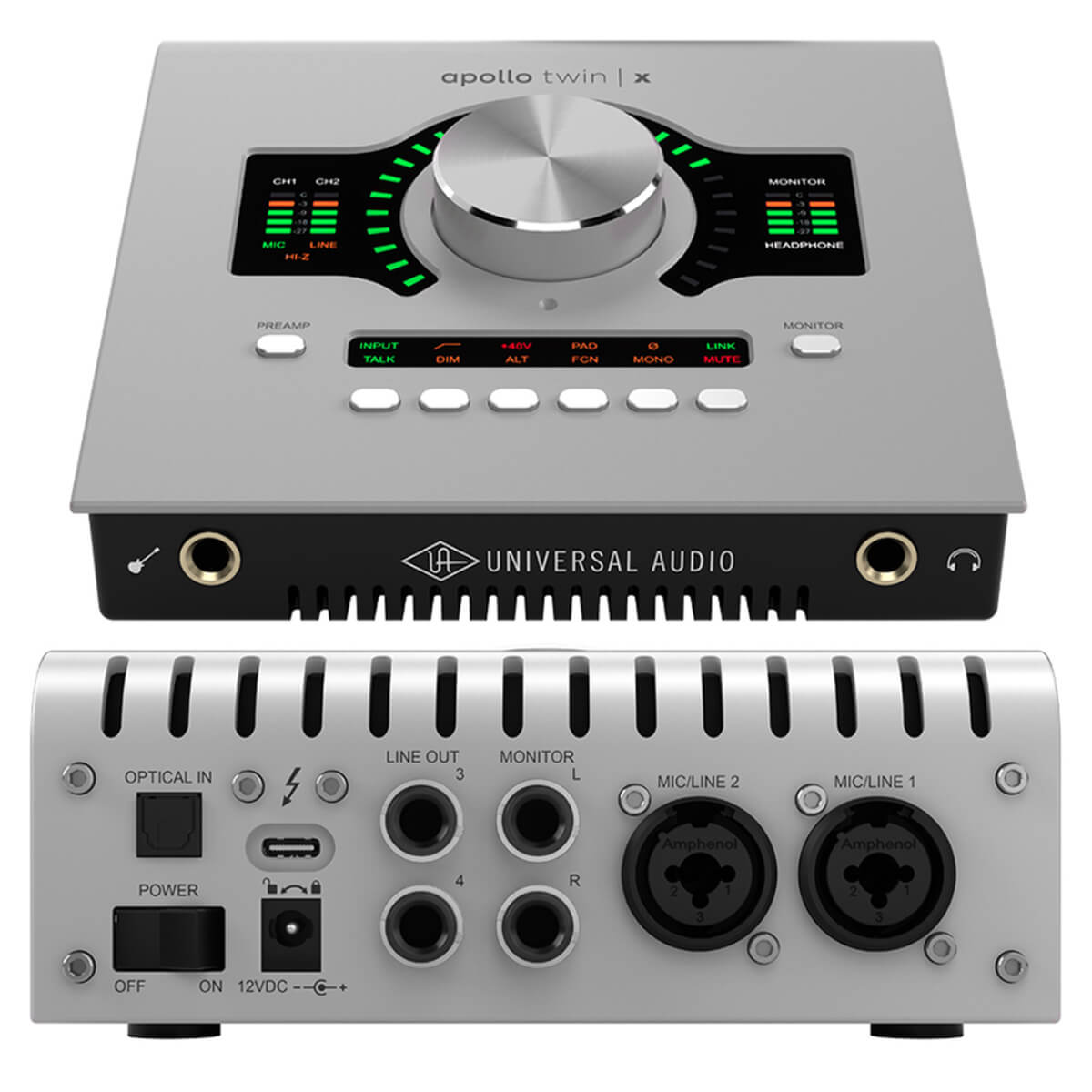
UAD Apollo Twin Duo is among the best studio sound cards, offering reference-quality converter sound. Its built-in DSP processor lets you use UAD plugins in real-time. This excellent sound card is perfect for professional sound recording, mixing, and mastering. Build quality is superb, and its stylish, compact design makes it easy to transport for gigs or business trips. All essential controls are conveniently located on the top panel. It does have only one headphone output.
The UAD Apollo Twin Duo is a solid external sound card that professionals will appreciate.
- Excellent converter sound
- High-quality build and compact design
- DSP processor and the ability to run plugins within the sound card
- High-quality plugins from Universal Audio
- Top converters for their price
- Mac and Windows compatibility (two versions of the card: Thunderbolt and USB)
- The sound card itself gets warm
4. RME BabyFace PRO FS
Best sound card for music up to $1000 (listening and recording) — with a high-quality headphone amplifier
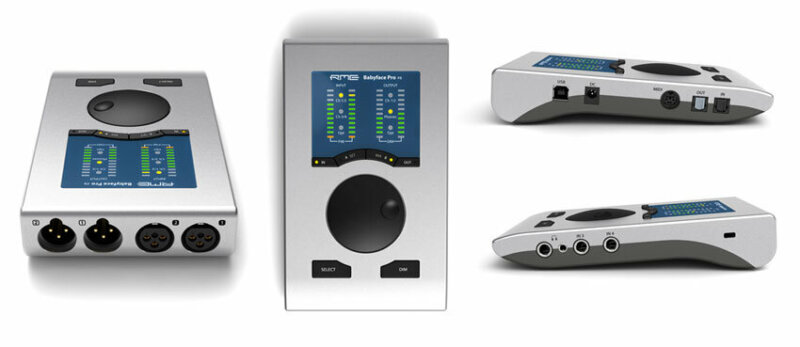
The RME Babyface Pro FS is the best sound card for both listening to and creating music in such a compact form factor. It also delivers high-quality recording for vocals and guitar. Top-notch converters and stable operation are hallmarks of the RME brand, which is why professionals consistently choose their products. Its compact body and included case make it easy to take on the road or on tour. The RME Babyface Pro FS is particularly well-suited for critical headphone listening; if that’s your primary goal, this card is a great choice. It features two headphone outputs.
The RME Babyface Pro FS is a sound card for audiophiles and musicians alike – a professional solution in a portable package.
- Excellent converter sound
- High-quality build and compact design
- All controls on the top panel
- Top converters for their price
- Mac and Windows compatibility
- Driver stability
- The card's design is specific
5. Arturia AudioFuse Studio
Best sound card for guitar up to $1200 — with minimal latency
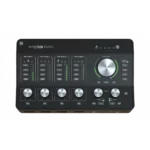
The Arturia AudioFuse Studio is an audio interface from Arturia with minimal latency. It features excellent onboard converters and is ideal for recording vocals, guitars, and other instruments. With 18 inputs, it supports multi-channel recording. The interface is intuitive and conveniently located on the top panel. Stable driver performance is a significant advantage. If you’re seeking a capable solution for your studio, the Arturia AudioFuse Studio offers professional-grade performance.
The Arturia AudioFuse Studio isn’t a budget-friendly audio interface; it’s a professional solution for advanced users.
Recording on Arturia AudioFuse Studio – Voice on Lewitt 440 Microphone, Guitar on Lewitt 440 Microphone, Electric Guitar and Vocals on Lewitt 840
- Excellent preamp sound with low self-noise
- Excellent output converters
- Large number of inputs and outputs
- Bluetooth connectivity option
- Convenient card interface and controls
- Convenient and flexible audio driver
- Excellent build quality
- Stylish appearance
- The card heats up, which is normal for this model
6. Antelope ZEN Go
The best audio interface with a DSP processor and top-tier AD/DA converters
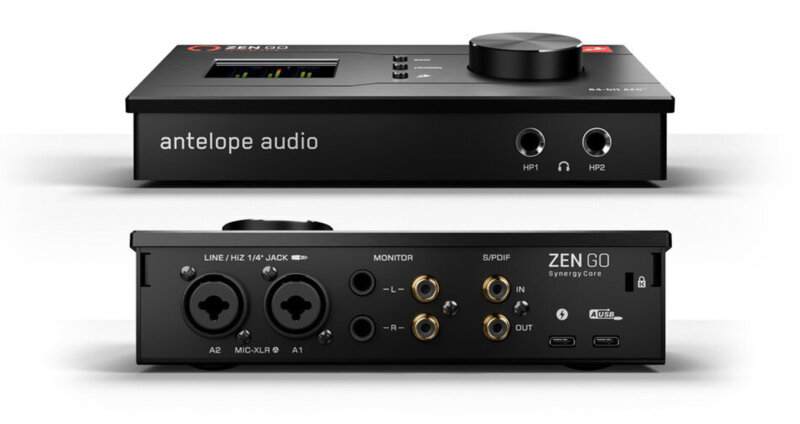
The Antelope Zen Go is an audio interface featuring a DSP processor and top-tier AD/DA converters. Its key features include console-level Discrete preamps with 65 dB of gain and the ability to use DSP processing with emulations of the best vintage gear plugins. The Antelope Audio Zen GO is one of the best audio interfaces in its price range, offering DSP processing, S/PDIF connectivity, and two headphone outputs. These features make the Antelope Audio Zen GO a compelling choice for musicians and sound engineers.
The Antelope Zen Go serves as an alternative to the UAD Apollo Solo, offering a broader connection interface and a distinct sound from its preamps and converters. I personally own this interface and use it as my primary device. I highly recommend it!
Recording Antelope ZEN GO – voice, voice with DSP processing, vocals and guitar
- Sound
- Build Quality
- What's in the box
- Critical drawback
- Non-critical drawbacks:
7. Motu Ultralite mk5
Audio interface for microphone — a professional, portable solution for the studio
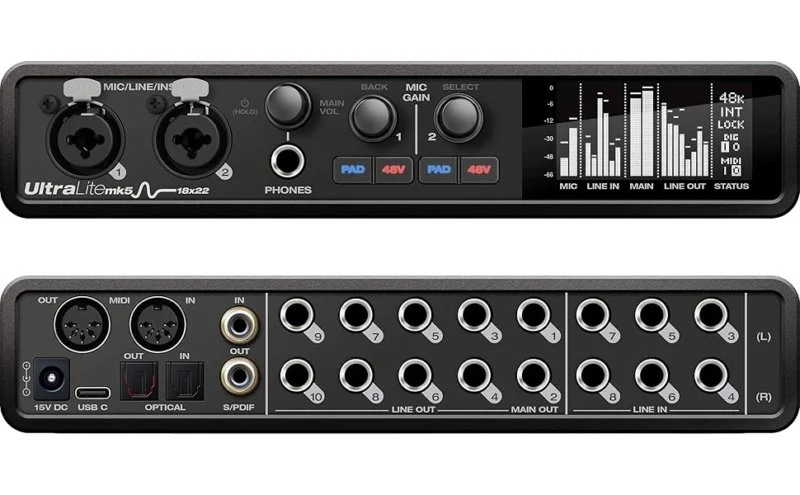
The Motu Ultralite mk5 audio interface is a professional solution for recording guitar and microphone in an ultra-compact body. It’s ideal for both precise studio work and complex live setups.
The standout feature of this fifth generation is its updated DSP processor, which handles all processing (EQ, compression, reverb), freeing up your computer’s resources and simplifying complex routing. The interface is equipped with premium ESS Sabre32 Ultra™ converters, delivering a crystal-clear signal with a 125 dB dynamic range.
It boasts a record-low latency of 1.83 ms (Round Trip), enabling comfortable real-time sound monitoring. The Motu Ultralite mk5 is a versatile tool for recording vocals, instruments, podcasting, and live streaming, thanks to its Loopback function. The interface supports remote control via the CueMix 5 app (from computers or mobile devices over the local network). It has only one headphone output, but it’s built on a high-quality circuit and has enough power to drive high-impedance models.
The Motu Ultralite mk5 is a professional audio interface for recording studios and producers.
- Top ESS Sabre32 converters (sound comparable to flagship interfaces)
- A surprisingly high channel count for its compact size
- Stable drivers with extremely low latency
- Standalone operation (can function as a mixer without a computer)
- Requires an external power supply (does not operate on USB power alone)
- Only one headphone output (with this many channels, you often wish for two)
- Remote control requires a router and network connection (no direct Wi-Fi)
8. UAD Apollo Solo
The best external audio interface for a computer or laptop under $600 — with a DSP processor
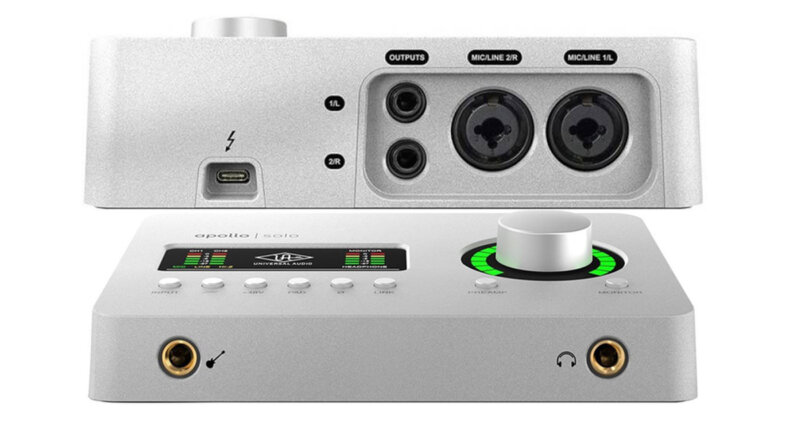
The UAD Apollo Solo is a professional audio interface for computers, positioned between budget interfaces and reference-grade options. It incorporates the best of UAD: excellent converters, a DSP processor, a suite of UAD plugins that work in real-time with the DSP, and a powerful headphone output. The UAD Apollo Solo is a professional choice for musicians and home producers. It features only one headphone output. This computer audio interface delivers high-quality recordings of vocals and instruments and assists in mixing and mastering your tracks. If you’re an audiophile seeking a high-quality DAC for music listening, the UAD Apollo Solo can fulfill that need. It’s available in two versions for computers: Thunderbolt (Mac) and USB-C (Windows).
The UAD Apollo Solo is an audio interface for your laptop and computer, featuring reference-grade converters.
- Reference converters from UAD
- Compact build and stylish design
- DSP processor
- Set of high-quality plugins from UAD
- Powerful headphone output
- Mac and Windows compatibility
- One headphone output
- Two versions: Thunderbolt and USB, be careful when choosing
9. Lewitt CONNECT 6
Portable external audio interface for Phones, iPads, and PCs — for streams, podcasts, and music
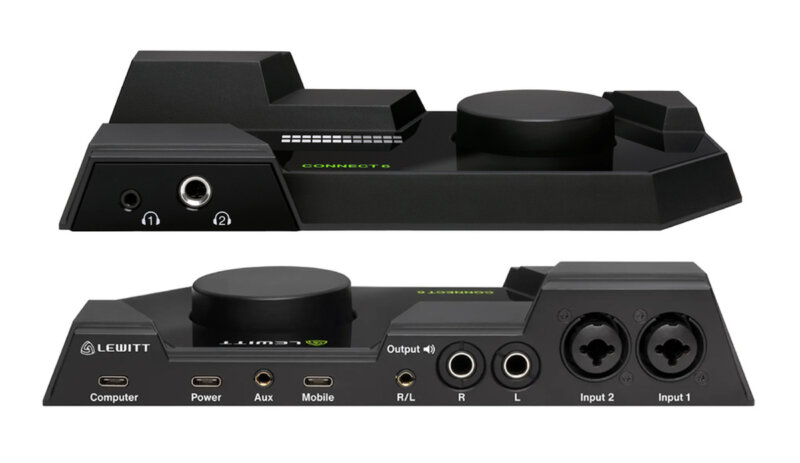
The Lewitt CONNECT 6 is Lewitt’s first streaming audio interface. Lewitt, known for its excellent microphones, clearly knows how to build superb preamplifiers. This portable audio interface features powerful, high-quality 72 dB preamplifiers. It’s designed for musicians, home producers, bloggers, and podcasters, offering everything needed for broadcasting: good converters, DSP effects, and a wide array of connections. You can even stream from your iPhone with it. It includes two independent headphone outputs.
The Lewitt CONNECT 6 is an audio interface suitable for both your smartphone and your studio.
Recording on Lewitt Connect 6: Voice without DSP, Voice with DSP, Guitar Fingerpicking, and Guitar Strumming.
- High-quality preamps with 72 dB gain and -133 dB self-noise
- Convenient driver interface and single-knob card control
- Audio driver stability
- Card portability, ability to work with Mac, Windows
- Smartphone connection and audio streaming to social networks
- DSP Effects and automatic preamp adjustment
- Stylish appearance and build quality
- Lack of Hi-Z
10. Audient ID4 MKII
The best budget audio interface for recording vocals — best sound for $150
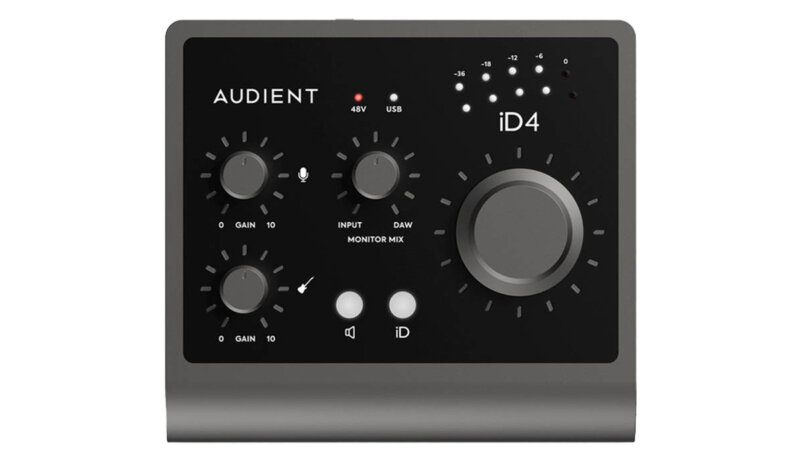
The Audient iD4 MKII is the best budget audio interface for recording vocals or instruments. For its $150 price point, it offers the best converters on the market. Stable driver performance and excellent sound make it the top choice among budget audio interfaces. It includes two headphone outputs. If one microphone input isn’t enough, consider the Audient ID14 model. I personally use this inexpensive computer audio interface and, after trying many devices in this class, it has truly captured my heart 😉.
The Audient iD4 MKII is an audio interface for creating and reproducing music at a high, quality level.
Recording on the Audient ID4 MKII: vocals, guitar, and GUITAR Hi-Z.
- Excellent design
- Robust build
- Excellent sound quality
- Ability to connect two pairs of headphones
- Powerful headphone output
- USB-C interface
- Loud button clicks
- No On/Off button
- Phantom power button on the rear panel
- Only a USB-C to USB-C cable is included
11. PreSonus Studio 26c
Affordable audio interface for a home studio (for speakers/monitors) — great sound from Presonus
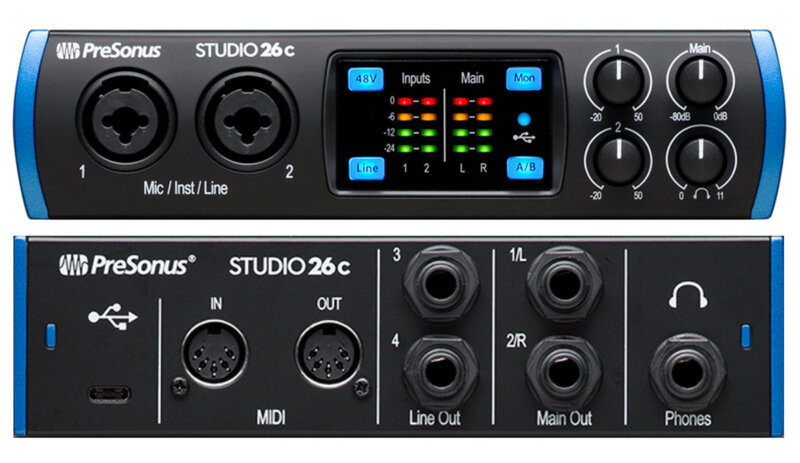
The PreSonus Studio 26c is an affordable audio interface for home studios. Its excellent converters enable high-quality sound recording and playback at 24-bit/192 kHz. A convenient LCD signal indicator helps accurately set microphone gain. The headphone amp offers detailed and clean sound, though it has only one output. I can attest to the driver stability of this audio interface, making it a great choice for home studios. A nice bonus is the included Studio One 6 DAW.
The PreSonus Studio 26c is the best audio interface for your monitors and microphone, priced at $320.
- Excellent XMAX-L preamps
- Good build quality and stylish appearance
- LCD signal indication
- Stable driver performance
- Powerful headphone output
- Mac and Windows compatibility
- One headphone output
12. Universal Audio Volt 2
Excellent external audio interface for PC up to $260 — UAD plugins included
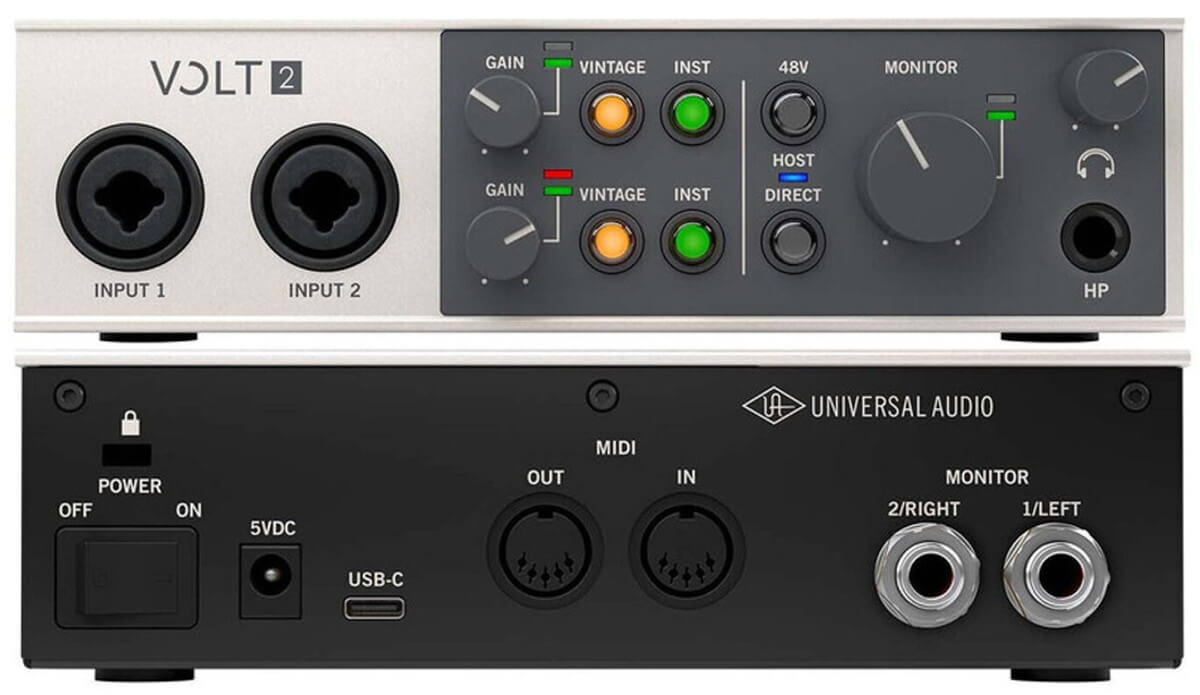
The Universal Audio Volt 2 is an external audio interface for PC or mobile devices. High-quality converters and excellent 55 dB gain will help you record vocals or instruments, or conduct live streams and podcasts. The interface looks stylish and is built to last. It has only one headphone output. It comes with good bundled software and plugins from UAD. I’ve tested the stability of this PC audio interface, and it performs well. It’s a solid choice for musicians and home producers.
The Universal Audio Volt 2 is the best audio interface for PC costing up to $260.
Recording with UAD Volt 2: vocals and guitar.
- High-quality converters and decent sound for $260
- Convenient controls, everything is on the front panel, buttons are backlit
- The card installs and works stably with easy driver and software setup
- The card is compact, can work with iOS, MacOS, Windows
- Stylish appearance and excellent build
- One headphone output
- Subjective. Inconvenient placement of knobs and buttons on the front panel
13. Solid State Logic 2
Best affordable external audio interface up to $200 — 4k mode for preamp
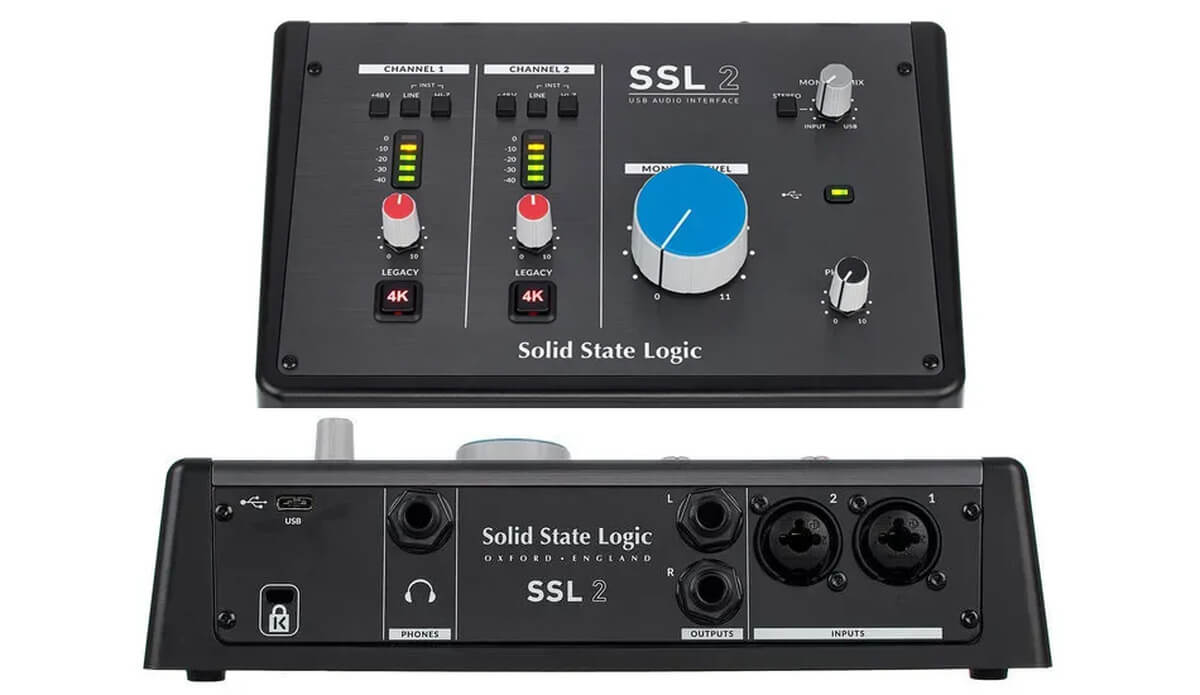
The Solid State Logic 2 is an affordable audio interface from the legendary SSL company. This external audio interface is perfect for home studios and delivers high-quality sound. Its good preamps ensure quality recordings, and the 4k mode (emulating the SSL 4000 console sound) can enrich your source signal. The bundled software helps you start creating or mixing music right out of the box. It has only one headphone output, but the SSL 2+ version includes two.
The Solid State Logic 2 is the best audio interface for small studios or home use.
- Excellent SSL-developed preamps
- Good build and vintage appearance
- Large and comfortable control knobs
- 4K mode for the preamp
- Powerful headphone output
- Mac and Windows compatibility
- Quite large dimensions
14. Arturia MiniFuse 2
Inexpensive external audio interface — with minimal latency and good preamps
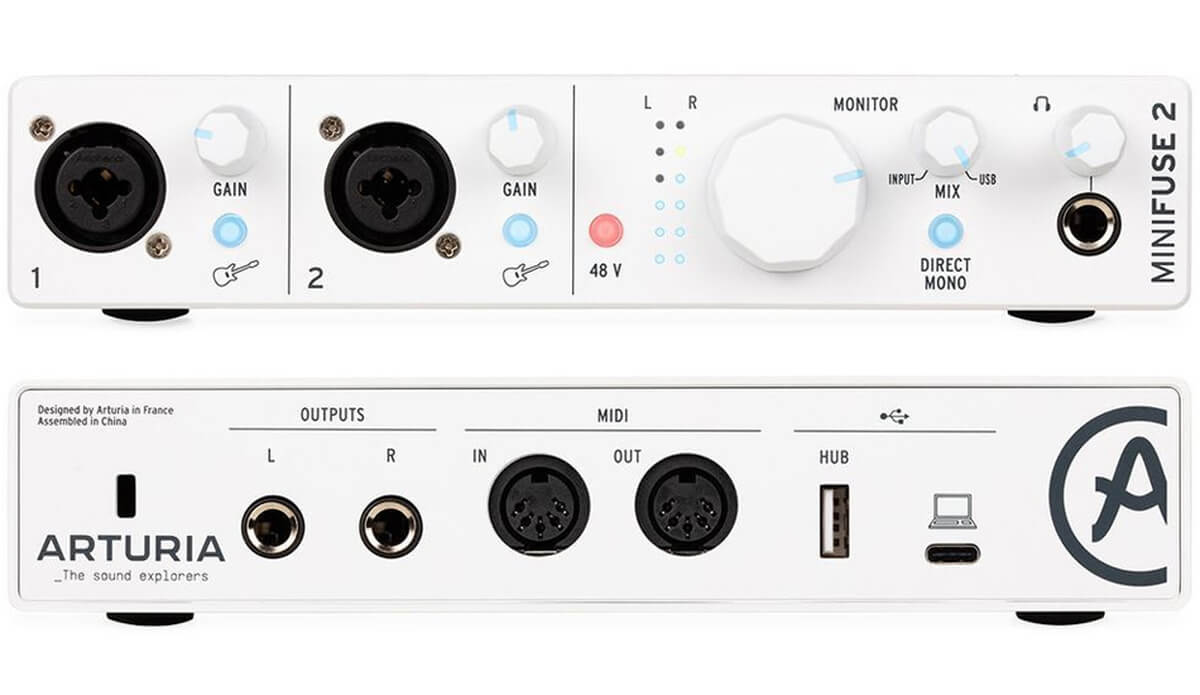
The Arturia MiniFuse 2 audio interface is an inexpensive external USB audio interface for $200, offering dual-channel recording capabilities, ideal for beginners and music enthusiasts. It’s convenient for mobile use (phantom power) and working on your laptop at home. It would be an excellent solution if you perform live and need something affordable yet flexible. The illuminated and sturdy knobs are particularly useful for LIVE performance.
This affordable audio interface is suitable for recording acoustic and electric guitar directly or via microphone. It’s a good option for recording vocals via microphone at home or on the go. Key features of the Arturia MiniFuse 2 audio interface include its minimalist design, excellent converters (DAC/ADC) for $200, and bonus subscriptions to Arturia services and plugins. It has only one headphone output. The Arturia MiniFuse 2 is the best inexpensive audio interface for home production.
- Excellent design
- Backlit input and output indicators
- Useful software and plugins included
- Rubberized knobs
- Ability to operate at 24-bit/192kHz
- Good DAC and ADC converters
- Stiff knobs
- Would like a more powerful headphone preamp
- Outdated USB 2.0
15. Focusrite Scarlett SOLO 4nd Gen
External audio interface with phantom power — the most popular interface among beginners
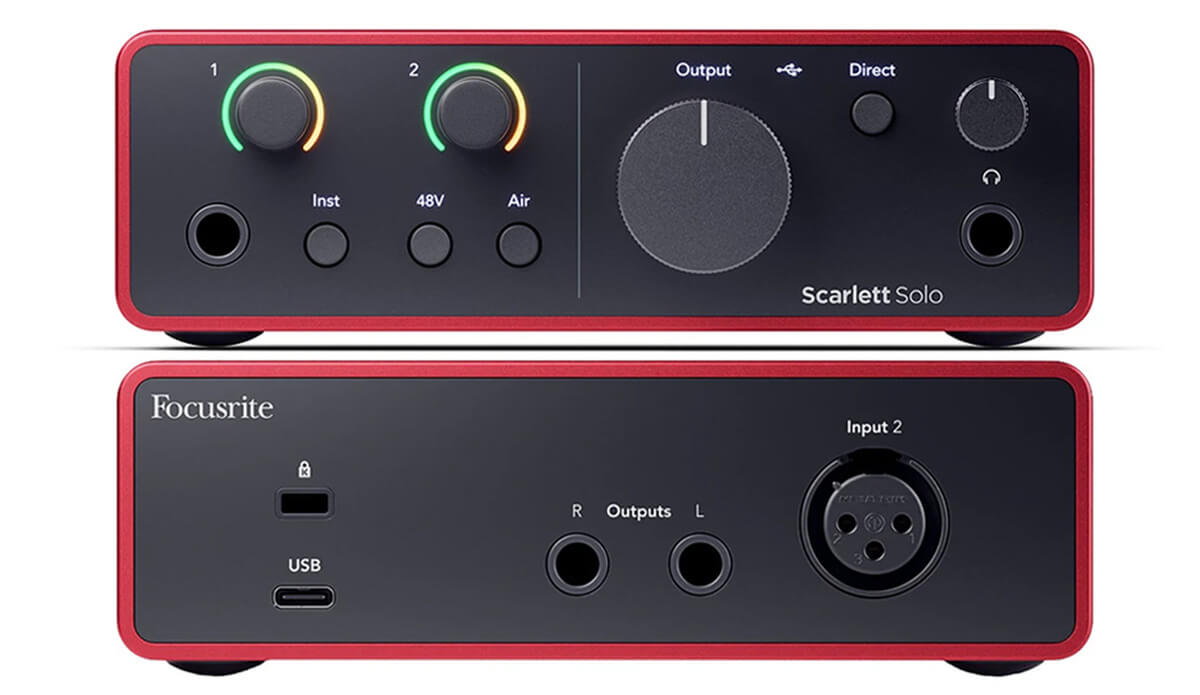
The Focusrite Scarlett SOLO 4th Gen is a budget USB audio interface for aspiring musicians and home producers. It features two inputs (Jack 6.3 and XLR) with two Air modes, which saturate the signal, adding an airy and warmer quality. The monitor output uses balanced TRS connectors, and the headphone output is quite powerful, though there’s only one. For recording with two people, you’ll need an adapter. This external audio interface comes with good bundled software, including plugins and a sequencer to get you started. If you’re a Focusrite fan but want something more premium, check out the Clarett line; they offer higher-quality converters and a more advanced class of interface.
Recording on the Focusrite Scarlett Solo 4th Gen: vocals, acoustic guitar, and electric guitar.
- High-quality converters and decent sound for $180
- Convenient controls, everything is on the front panel, buttons are backlit
- Stable and user-friendly driver and software
- The card is compact, can work with iOS, MacOS, Windows
- Stylish design and excellent build
- AIR mode and Direct Monitor
- Subjectively inconvenient placement of the XLR input on the rear of the card.
Which external audio interface to choose?
What to look for when choosing an audio interface?
1. Number of Channels

The number of channels an audio interface offers impacts its size, capabilities, and cost. I recommend selecting a device that matches your specific needs. If you’re only recording yourself, a solution with two inputs and a couple of outputs will be sufficient. However, if you need to record, for example, a band, you’ll naturally require more channels.
2. Microphone Preamps

Microphone preamps are crucial in an audio interface. Generally, the more expensive the interface, the better its converters (mic preamps) will be. It’s worth checking if the interface has phantom power for condenser microphones and the gain level the preamp can provide for dynamic microphones; 50 to 58 dB of gain is typically necessary for the latter. Pay attention to this 😎. A wider dynamic range on the ADC leads to higher quality and more natural digitized sound.
3. Instrument Input (Hi-Z)

The Instrument Input (Hi-Z) is a connector for plugging in guitars and other passive instruments. This input is usually a separate 6.3mm Jack on your interface or activated via a button if the interface uses a combo jack. Remember to enable Hi-Z mode only when recording guitars with passive pickups. The Hi-Z input provides high gain. If you’re recording active instruments like synthesizers or guitars with active pickups, a regular line input will suffice.
4. Monitor Outputs

Monitor outputs are typically found on the back panel of the interface and are used to connect speakers (monitors). Check the number of output pairs. If you have two pairs of monitors, choose an interface with two pairs of outputs to connect both. I recommend paying attention to the output connectors themselves: balanced Jack or unbalanced RCA. Most modern interfaces use balanced (6.3mm Jack) connectors. Regarding performance, the dynamic range the DAC can deliver is important; a wider range results in higher quality and more natural transmitted sound.
5. Headphone Outputs

Headphone outputs are a vital element for sound recording. Most good audio interfaces come equipped with powerful outputs, often more than one. If you need to record yourself along with clients or friends, look for solutions with two or more headphone outputs. Don’t forget to check the output power; less powerful interfaces might struggle to drive high-impedance headphones like the Beyerdynamic 990s at 250 Ohms.
6. ADAT and SPDIFAES Inputs
ADAT and SPDIFAES inputs allow you to expand the input and output capabilities of your audio interface. These ports operate via a digital protocol and are typically found on non-budget interfaces.
7. Direct Monitor Function

The Direct Monitor function is extremely useful during recording when you need to hear the input signal with zero latency. While modern computers can handle low sample rates, some latency might still occur. For high-quality recording, vocalists and instrumentalists need clear monitoring of themselves. Almost all modern interfaces offer direct monitoring, which can be in mono or stereo. More advanced interfaces provide switching between mono and stereo monitoring, along with a mix of direct monitoring and your DAW signal.
8. MIDI IN/OUT Port:

The MIDI IN/OUT port is designed for connecting MIDI devices such as analog synthesizers and other compatible gear.
9. Sample Rate and Bit Depth

Sample Rate and Bit Depth. The number of bits in the digital-to-analog converter determines the quality of the output signal. Most modern audio interfaces feature 24-bit or 32-bit (floating-point) DACs, while budget options start at 16-bit. The sample rate is the frequency at which signal digitization, conversion, or processing occurs; a higher number generally results in a more natural signal. Common values include 44.1, 48, 88.2, 96, and 192 kHz.
10. ASIO Driver

The ASIO driver is the protocol that enables your audio interface to communicate with your computer. This driver minimizes input and output latency. Most audio interfaces on the market include their own adaptations of this driver with a unique manufacturer interface, allowing you to configure your device.
11. Latency (Sample Rate)
Latency (Sample Rate) is a common characteristic of audio interfaces. Time is required for your computer to process information and convert it into sound. The greater the load (VST instruments or effects) in your workstation, the more CPU power is needed, thus increasing latency. At a low Sample Rate, I recommend recording, and you can use direct monitoring while performing sound processing, mixing, or mastering at higher Sample Rate values. Latency is typically displayed in Samples or milliseconds (ms.).
What types of audio interfaces are there?
Audio interfaces can be broadly categorized into four types based on their connection to a PC: USB (USB-C), PCI-Express, Thunderbolt, and FireWire.
Audio Interfaces — USB (USB-C):

USB (USB-C) interfaces are the most common among all types for general users. These interfaces are typically mobile, include all necessary recording and output functions, and are available in both expensive and budget-friendly options.
Audio Interfaces — Thunderbolt:
Thunderbolt interfaces offer a fast connection, are generally user-friendly, and are optimized for Mac devices. They are usually not budget-friendly but provide a similar set of functions as other audio interfaces.

Audio Interfaces — FireWire:

FireWire isn’t a distinct interface type but rather a connection method. It’s a rather outdated connection method that, in today’s landscape, is significantly slower than current USB-C and Thunderbolt solutions.
Audio Interfaces — PCI-Express:
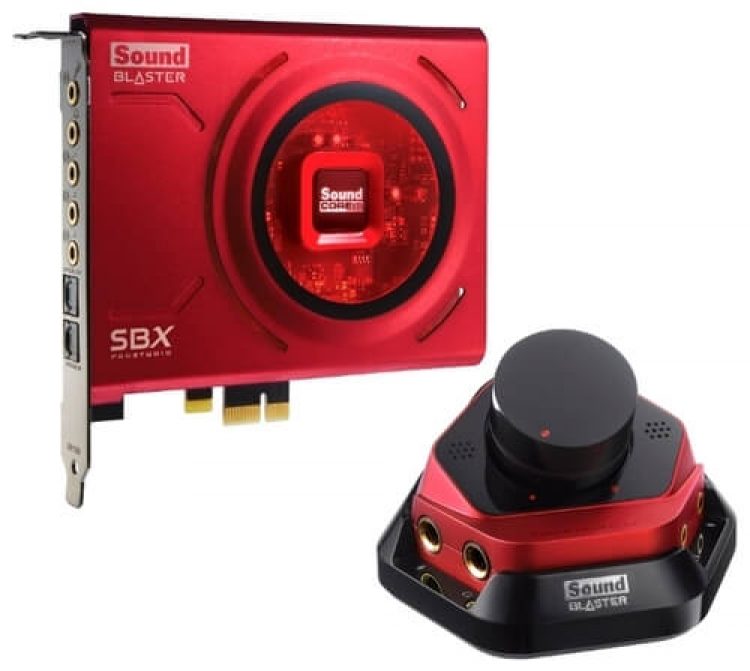
PCI-Express interfaces are installed directly into the computer. This is an outdated and inconvenient solution in the era of laptops, although some models offer sound quality that can surpass many USB audio interfaces (e.g., RME HDSPE RAYDAT, ESI MAXIO XD).
Audio interfaces with DSP processors — what are they for?

These interfaces are not inexpensive, with popular choices often being models from UAD and Antelope. They feature built-in processors for handling the included plugins, eliminating latency during recording or mixing and significantly unloading your computer’s processor. This enhances workflow comfort, and plugins from UAD and Antelope are renowned for their sound quality. Interfaces like the Antelope Synergy Core or UAD Apollo Twin are premium options, best avoided by beginners for now.
What makes these interfaces so good? Clearly, processing with plugins without latency not only simplifies recording but also unloads your computer’s processor, thereby improving workflow comfort. UAD and Antelope plugins are celebrated for their sound quality. Interfaces like the Antelope Synergy Core or UAD Apollo Twin are not budget-friendly; if you’re a beginner, it’s best to skip these models for now.
Bundled software with the interface — why is it needed and what types are there?

Modern sound cards often come bundled with cut-down or full versions of DAWs and VST plugins. When you purchase a card from UAD or Arturia, you’ll find not only the audio interface but also excellent plugins from these manufacturers. This generosity allows you to connect the card to your computer right out of the box and start creating music.
Gaming sound cards — what are they and why?

This type of sound card is designed for gamers or users who don’t require professional audio work. These cards can offer good sound, attractive designs, and support for 5.1 or 7.1 surround sound systems. Among them, you’ll find both USB and PCI-Express solutions.
How are sound cards classified?

Sound cards can be more easily categorized by level: budget, good, and professional.
Budget cards typically have one microphone and instrument input and utilize less expensive converters.
Examples:
- Behringer um2
- Focusrite Scarlett Solo
- Lexicon Alpha
Good cards feature two or more microphone and instrument inputs/outputs, good quality converters, and a powerful headphone output.
Examples:
- Audient ID14 MkII
- UAD Volt 476
- Presonus 26C
- Focusrite Clarett 2Pre
Professional cards offer two or more inputs and outputs, ADAT, SPDIF, and other expansion options, and may include DSP processors and high-quality converters.
Examples:
- UAD Apollo Twin
- Antelope Synergy Core
- RME BabyFace PRO FS
- Apogee Symphony
Conclusion

It’s crucial for you to determine your specific use case for the card. If you need a card solely for listening to music and gaming, you don’t need to look at professional solutions; good options can be found among gaming or multimedia devices. If you’re a beginner musician recording yourself, focus on good cards with one or two microphone inputs and a pair of balanced outputs. I hope this article has been helpful and assisted you in making your choice 🙂.

Frequently Asked Questions:
USB or Thunderbolt: which transmits sound with higher quality?
The connection interface doesn’t affect sound quality; it only impacts the data transfer speed between the computer and the card.
Does a sound card participate in rendering audio files?
No, it solely converts analog sound to digital (ADC) and vice versa (DAC), except for cards with onboard DSP processors for their own processing.
Can a USB microphone be connected to a USB sound card?
No. It connects only to the computer, and the sound card should be used as an audio output device.
Is there a big difference between a $200 card and a $1000 card?
Yes, significantly. In terms of connection options, converter quality, and driver optimization. In almost every aspect, expensive cards will outperform budget ones. Budget cards only win on price 😆.
Does Mac require a special sound card?
No. Almost all USB cards work stably on Mac. However, Thunderbolt solutions are generally preferred.
How to download and update sound card drivers?
You need to download the sound card driver from the official website (example for Steinberg UR242 sound card). An alternative is to use a driver installer like IObit Driver Booster, which will automatically find and install the necessary driver. However, I recommend searching and installing manually; you shouldn’t fully trust automatic driver installation programs.
Do you still have a question?
Ask your question in the comments, and I’ll answer you.
