

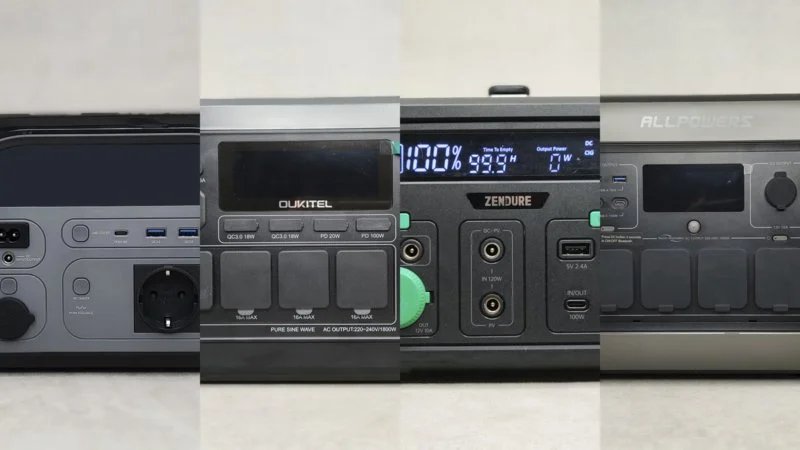
This is a ranking of the best power stations tested on MyChooz. This is a TOP-4 from our real-world use, and I will tell you right away, friends, I know about EcoFlow, Bluetti, OUKITEL, and others. This ranking will grow, and it will also push makers to send their models for fair testing. Also, I will be thankful to you, friends, if you send your station for a good test and a spot in the ranking.
Power stations are big power banks with a built-in battery, often with one or more 110-220V outlets. Each power station has extra ports to charge different electronics at the same time: phones, routers, laptops, PCs, fridges, TVs, and more. Power stations are good for many tasks: backup power at home, outside, or when traveling; as an uninterruptible power supply for a PC, router, or server; as a general charger for different devices. This is a new ranking, and for now, it only includes power stations from my own use.
The first commercial stations came out around 2015-2017. The most active growth phase and affordable consumer stations came out in 2023-2024. Now, power stations are growing fast. The quality and reliability of batteries are getting better, and prices are going down. Slowly, power stations are moving from being a “luxury” to being work tools and a way to be energy-free when used with fixed and foldable solar panels.
Test settings:
- AC test: discharge through a PC with 90-110 W power. We measured it with Atorch S1W.
- DC test: discharge through a power bank with 100 W throughput. We measured it with the FNIRSI FNB58 USB tester.
All ratings in the review follow our testing method V0.1 – 30.04.2026.
Learn more about how we rate charging stations.Rating V0.1 – 30.04.2026.
We rate each parameter on a 10-point scale. The highest score is 10 points, and the lowest is 0.1 points. For each criterion, the station can get 10 points. For a fair rating, each criterion includes extra points, from 1 to 3. So, in the first testing stage, some parameters might score 1-2 points above the maximum rating. In that case, the rating stays at 10 points. This helps avoid overly strict rating rules. More stations can aim for the highest rating, not just possible prototypes on paper or premium models tested in perfect lab settings.
Also, we consider “port value” for several same ports. The idea is simple: people use 1-2 ports more often than 4-6 ports. So, the fewer USB ports and outlets, the higher the rating. But a large number of ports will still get a higher rating, just with a smaller difference in score. This way, there will not be a huge gap in ratings between stations with one 220V outlet and, say, a station with 5-6 such outlets.
As we test new charging stations and get new info, we will adjust the rating system. We plan to correct and review the rating at the start of January each year. Then, we use the rating system for a year until the next review.
If you do not agree with the rating system and want to suggest a better way to score, leave your ideas in the comments.
Performance rating.
The performance rating comes from five points:
- Battery
- Battery type
- AC output power. (AC ports)
- DC output power. (DC ports)
- Input power. (Station charging power)
1. Battery. We rate 2 parameters:
Amount of stored energy. We check how much energy the battery stores. We take off 0.1 points for every 1% less than the stated amount. We check the remaining charge after discharge.
Conversion efficiency. We check how much energy the battery gives out with a 100W load through a 220V outlet. We take off 0.1 points for every 1% below 80%.
2. Battery type:
We rate the battery chemistry and cycle count:
- 1-2 points: for lead-acid and lithium-cobalt.
- 3-4 points: for nickel-cobalt-aluminum.
- 5-6 points: for nickel-manganese-cobalt.
- 7-10 points: for sodium-ion, lithium-iron-phosphate, and lithium-titanate. The score changes based on the stated lifespan.
3. AC output power:
A station with one outlet gets 2 points. Each next outlet loses 25% of the previous score.
| 1st outlet | 2.00 | 2.00 |
| 2nd outlet | 1.50 (2.00 – 25%) | 3.50 |
| 3rd outlet | 1.12 (1.50 – 25%) | 4.62 |
| 4th outlet | 0.84 (1.12 – 25%) | 5.46 |
| 5th outlet | 0.63 (0.84 – 25%) | 6.09 |
| 6th outlet | 0.47 (0.63 – 25%) | 6.56 |
Outlet power rating:
+0.1 points for every 100 W of output power for 220V outlets. The maximum is 4 points. Stations over 4000 W do not get extra points yet.
4. DC output power:
Each port gets 1 point. Each next port of the same type loses 25% of the previous score.
The DC block includes 4 groups of ports:
- USB.
- Car cigarette lighter.
- Special ports: DC5521, Anderson, RV (48 V / 8 A).
- Wireless charging.
| 1st port | 1.00 | 1.00 |
| 2nd port | 0.75 (1.00 – 25%) | 1.75 |
| 3rd port | 0.56 (0.75 – 25%) | 2.31 |
| 4th port | 0.42 (0.56 – 25%) | 2.73 |
| 5th port | 0.27 (Limit) | 3.00 (Ceiling) |
| 6th port and beyond | 0.00 | 3.00 |
We calculate the power score based on 0.01 points for each stated 1W. We do not yet include the power of special ports in the total score.
5. Input power:
+0.25 points for every 100 W through the 220 V network.
+0.2 points for every 100 W through the solar panel.
+1 point for 12/24V charging. +1 point for charging with multiple methods at the same time.
Feature rating
The feature rating comes from four items:
- Screen and controls
- The app
- Safety
- More info
Screen and controls:
Screen information gets 0.5 points each: remaining charge, active modes, error code, charging/discharging power, remaining charging/discharging time. Maximum 2.5 points.
Screen quality:
- 2.5 points – OLED display.
- 1.5 points – LCD.
- 0.5 points – segmented display.
Screen usability:
- 1 point – backlight turns off.
- 1 point – readable in sunlight.
- 0.5 points – brightness adjustment.
Buttons:
- 1 point – physical button.
- 1 point – separate control for groups: USB, 220V, 12V, and so on.
- 1 point (+0.5 if partly) – buttons are large and you can hit the button with work gloves on.
- 1 point (+0.5 if partly) – buttons with backlight.
- 1 point (+0.5 if partly) – prevents accidental presses.
- 1 point off if the buttons beep and you cannot turn it off.
The app:
- 2 points for usage graphs or consumption stats.
- 1 point for runtime calculation and load (+1 point for separate power for 220V and USB).
- 1 point for remote control, 0.25 points if the connection drops.
- 1 point if there is a power-on timer and +1 point for custom power-off time settings.
- 1 point for active cooling control.
- 1 point for setting charge/discharge limits.
- 1 point for controlling the charging station’s power (+2 points for manual setting).
- 1 point for temperature control.
Safety:
- 0.6 points for each protection setting. 0.5 points if there are 10 or more protection settings.
- 0.5 points for showing an error code on the station screen. +1 point if it shows in the app and has a description with a solution.
- 0.5 points if you can see the battery status on the screen or in the app.
- 1 point if there is a fuse button.
Additional:
- 3 points for working in UPS mode (uninterruptible power supply), with no power loss during switching.
- 1 point for the battery capacity expansion feature.
- 0.5 points for a flashlight. +1.5 points if it comes with a separate light.
- 1 point for a cable storage compartment.
- +0.5 points for each fast charging protocol for USB ports. Protocols from different ports add up, repeated protocols do not. The maximum score is 5 points.
Build quality score
Three main factors make up the build quality score:
- Comfort
- Durability
- Design
Comfort:
We rate how easy the station is to use. The author gives this score individually. The maximum score is 10 points.
- General: 0-3 points – how easy it is to access the connection ports.
- Transport: 0-3 points – if it has hidden handles, an extendable handle, a strap, or wheels.
- Noise: 0-3 points – the noise level at maximum load. The more noise it makes, the lower the score.
- Size and weight: 0-3 points – how easy it is to store.
Durability:
We rate how strong the station’s build is. The author gives this score individually. The maximum score is 10 points.
- Material quality: 1-3 points – the materials used for building it.
- Dust and water resistance: 0-3 points – how well the whole build resists dust and water. You get +1 point for rubber covers on the ports. You get +1 point for dust filters.
- Assembly: 1-3 points – the quality of how it is put together. You get +1 point for reinforced parts in the assembly.
- Maintenance: 1-3 points – how easy it is to clean and replace parts.
Design:
We rate how it looks. The author gives this score individually.
EMMA — Experts + Methodology + MyChoozers + Algorithm.
Every model goes through identical tests; the score is calculated automatically with fixed weights — a spot in the rating cannot be bought.
1. OUKITEL P1000 Plus 7.61Best power station for home and outdoor use
Best power station for home and outdoor use among those tested on MyChooz.
Reasons to buy: it has a 1024 Wh battery, fast charging up to 1200 W, and up to 1700 W with dual charging. It has 4 220V outlets with 1800 W output power, 4 USB ports, and 4 ways to charge the station. It has a UPS mode and manual charge power control. Reasons not to buy: the data in the app updates slowly and often freezes. You cannot add more battery capacity with extra batteries. It makes an unpleasant sound when the active cooling works.
- 1024 Wh LPO battery, 1800W output power
- Fast charging up to 1200W and up to 1700W with dual charging
- 4 220V outlets, 4 USB ports, UPS, and manual charging power control.
- The data in the app does not update for a long time.
- There is no capacity expansion.
- An unpleasant sound when the active cooling works.
More details.
More details.
Battery capacity is 1024 Wh – 51.2V, 20A.
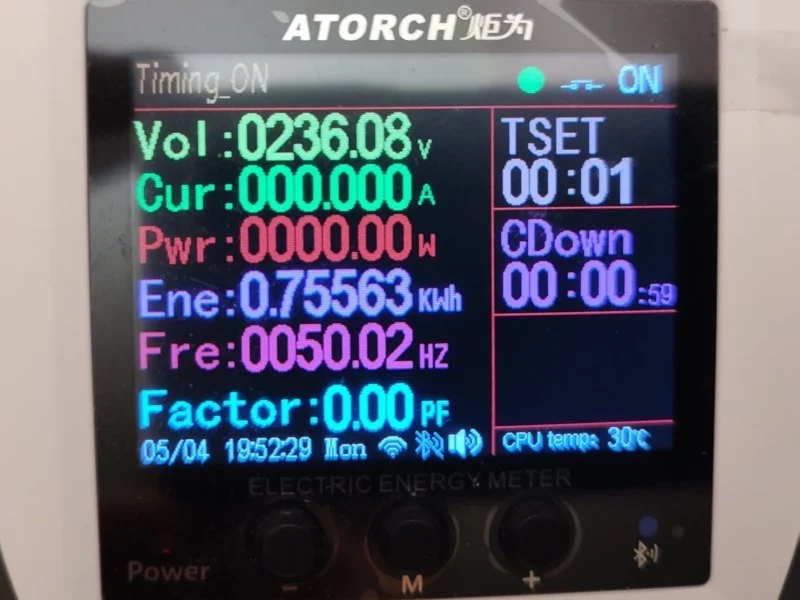
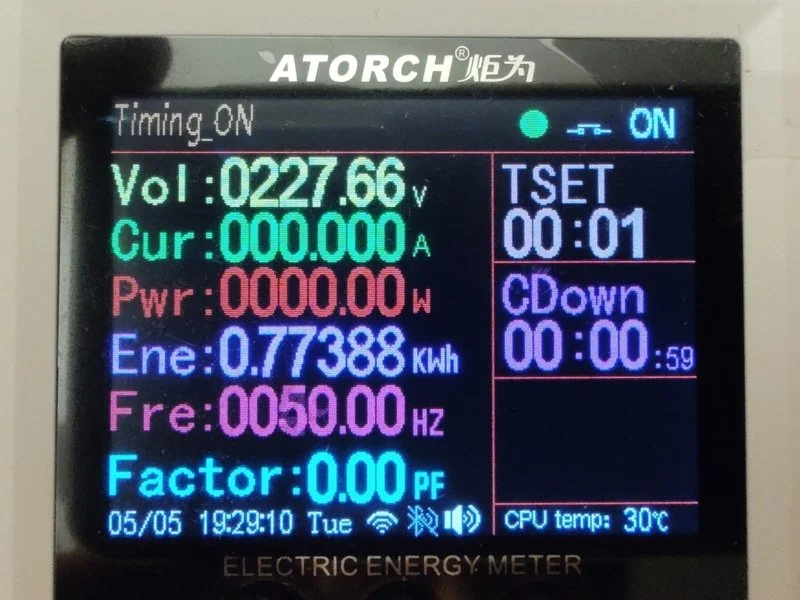
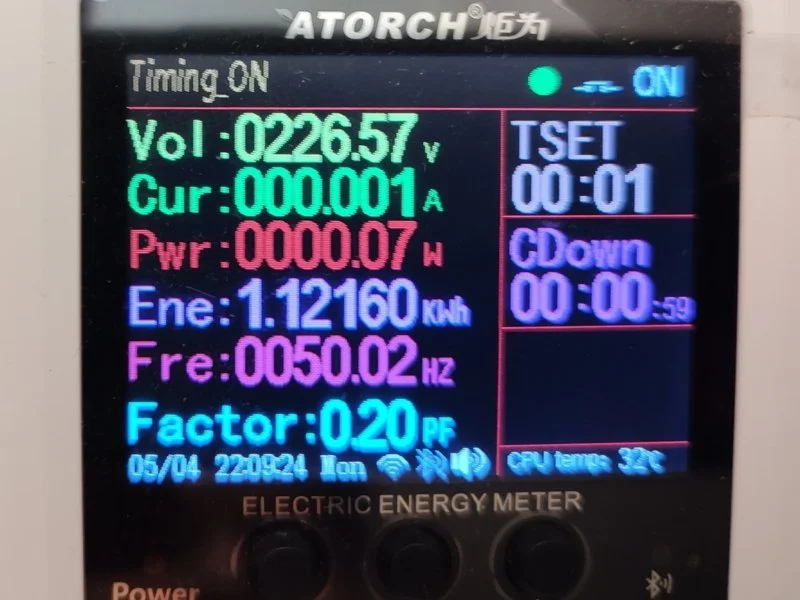
To check the capacity, I used a 220V smart outlet, the Atorch S1W.
When discharging, I got 750 Wh with 230V and 773 Wh with 220V. You choose the 220-240V voltage in the Wonderfree app for Android and iOS. The outlet itself uses about 2-3 W of power per hour. So you should add 20-30 W to the final result.
From 0% to 100%, I got 1121 Wh.
More details.
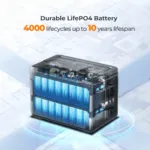
The maker promises 4000 charge and discharge cycles, which is about 10 years of daily use. The batteries are made to discharge to 90-100% and they do not lose capacity compared to normal Li-Ion batteries.
Battery chemistry for charging stations:
- LCO is almost never used in charging stations; this chemistry is for smartphones and laptops. We included it in the table below to give a full picture.
- You find NCA in portable stations with high energy density (some Jackery and EcoFlow products used NCA cells). Its lifespan is as weak as LCO.
- NMC is a common standard for most mid-range portable stations. It offers a good balance between weight, capacity, and price with a decent lifespan.
- LFP is the best choice for home and good portable stations. EcoFlow DELTA Pro, Bluetti AC300, Anker SOLIX, and other premium models use it. It has high safety and an honest lifespan of 3000+ cycles.
- LTO is a niche industrial chemistry. It has a great lifespan and temperature range, but low energy density and high cost make it not practical for home stations.
- Na-Ion is a fast-growing technology, and its cycle range is wider than batteries with other chemistries. Different makers test under different conditions: discharge depth, temperature, and charge speed. So, the results vary. 2,000+ cycles are for commercial cells based on layered oxides. Up to 10,000+ cycles are for advanced PBA cells and developments from CATL Naxtra.
| LCO (Lithium-cobalt) | 500–1,000 (Low) | ~1,4–2,7 | 150–200 (High, but unstable) | Charge: 32°F to +113°F. Discharge: -68°F to +140°F. Thermal breakdown at ~302°F |
| NCA (Nickel-cobalt-aluminum) | 500–1,000 (Low) | ~1,4–2,7 | 200–260 (Best among commercial types) | Charge: 32°F to +113°F. Discharge: -68°F to +131°F. Thermal breakdown at ~482°F |
| NMC (Nickel-manganese-cobalt) | 1,000–2,000 (Medium) | ~2,7–5,5 | 150–250 (Advanced up to 300+) | Charge: 32°F to +113°F. Discharge: -68°F to +131°F. Best at 68-104°F |
| LFP / LiFePO4 (Lithium-iron-phosphate) | 3,000–6,000 (High) | ~8–16 | 90–205 (Typically 120–160) | Charge: 32°F to +122°F. Discharge: -68°F to +140°F. Most safe |
| LTO (Lithium-titanate) | 10,000–30,000 (Extreme) | ~27–82 | 50–80 (Lowest density) | Charge: -104°F to +122°F. Discharge: -104°F to +167°F. Best temp. range |
| Na-Ion (Sodium-ion) | 2,000–10,000+ (Developing) | ~5,5–27+ | 100–175 (Typically 120–160) | Charge: 32°F to +113°F. Discharge: -104°F to +140°F. Store at 0 V |
Explanation for the table: cycles are shown until the battery reaches about 80% of its first capacity under normal conditions (77°F, full discharge depth). The real lifespan depends on discharge depth, temperature, and charging mode. We calculate the lifespan by dividing the number of cycles by 365 days.
More details.
The front panel has four 220/240V outlets.
Main specs:
- Constant power: 1800 W.
- Peak power: 3600 W.
More details.
On the front of the station, you will find X blocks with DC ports:
Block 1: car cigarette lighter. 12 V, 10 A (max. 120 W).
Block 2: DC5521: (12 V/3 A) 2 units.
Block 3: four USB ports – 2 USB-C and 2 USB-A.
- USB-C: up to 100 W. 5 – 20 V/5.0 A
- USB-C: up to 20 W. 5 – 12 V
- USB-A (2 ports): up to 18 W for each. 5 – 12 V
More details.
On the left side, there is a panel for charging the station.
List from left to right:
A universal C14 connector, like on a computer power supply and monitor, is for charging through a 220/240V outlet. There are 2 charging modes – 500 and 1200 W, and you adjust it with the switch to the right.
An automatic fuse button. If a power surge or overload happens during charging, this button will ‘pop out’ to protect the station’s internal parts.
Connector for external grounding.
XT60 connector. A universal input for DC charging through:
Car cigarette lighter. 12V / 24V DC. (cable not included).
Solar panel (you need a special MC4 -> XT60 cable). 12–50V, up to 500W.
Temperature range (Important!)
- Charging: 32°F to 104°F. You cannot charge it in freezing weather. When you charge it, irreversible chemical processes will start in the battery, which makes it fail faster.
- Discharging (use): from -50°F to 104°F.
You can use 4 ways to charge:
AC power or a gas/diesel generator.
Solar panel.
Car charging.
Dual charging. This is a mix of AC and solar panel charging.
More details.
More details.
What the icons on the screen mean
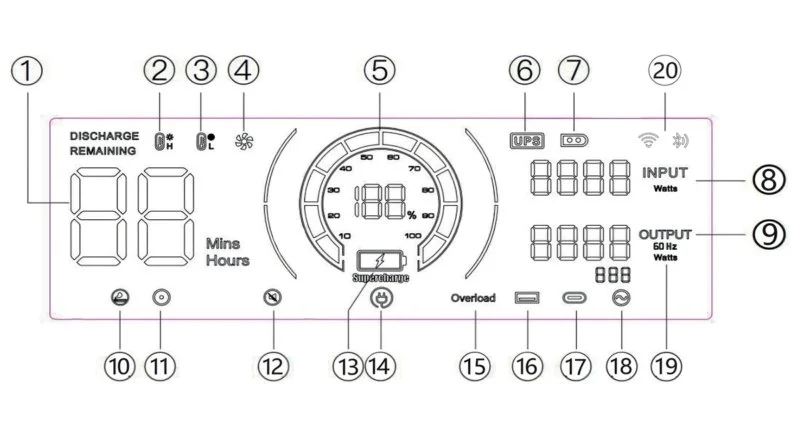
1 – Usage time / charging time
2 – High temperature protection
3 – Low temperature protection
4 – Fan status
5 – Power status
6 – UPS mode
7 – Solar panel charging mode
8 – Total input power
9 – Total output power
10 – Cigarette lighter output (12V)
11 – DC output (12V)
12 – Silent mode
13 – Fast charging mode
14 – Slow charging mode
15 – Overload protection
16 – USB output
17 – PD output
18 – AC output
19 – Frequency switch
20 – WIFI / Bluetooth
What the alarm icons mean
Fan: When this icon is on, make sure the air intake vents on both sides of the device are not blocked.
Thermometer (H/L): When this icon flashes, it means the device’s inside temperature is too high or too low. In this case, smart protection turned on, and the device stopped working. (You need to wait for the temperature to go back to normal before you use the station again).
Battery with lightning icon: This icon flashing means there is a problem with the output of that port. Please check the connected load.
Port icon group (outlets, USB): If one of these icons flashes, it means the output of that port is not working right. Check the load (the device you plugged in).
Crossed-out speaker: When this icon flashes, it means the device went into silent mode.
Control buttons
Power button
It turns the station on and off. Press and hold for 3 seconds to turn on the station until the screen lights up or turns off. A single press turns the screen backlight on and off.
AC button (Alternating Current)
It turns the 220V outlets on and off. Press the button once to turn them on or off. When the outlets are on but not in use, the inverter uses some power.
DC button (Direct Current)
A single press turns on and off the 12V ports, which are the cigarette lighter and DC5521, and the USB-A and USB-C ports.
Flashlight control button
It turns the flashlight on and off. Each press changes the mode:
- Bright light.
- Fast blinking
- Long blinking.
More details.
System requirements:
- Minimum operating system version for install: Android 7.0, iOS 15.1+.
- App version in review: V3.5.0
- App update date: April 24, 2026
- RAM usage — МБ (Motorola G72).
The app does not work well. The main problem is the data refresh speed. To see current data, you need to close the app and remove the process from RAM. Otherwise, the data updates after 2-3 tries. There are no other app problems.
The app has few useful features, and all features are split into two screens. On the first screen, you can find:
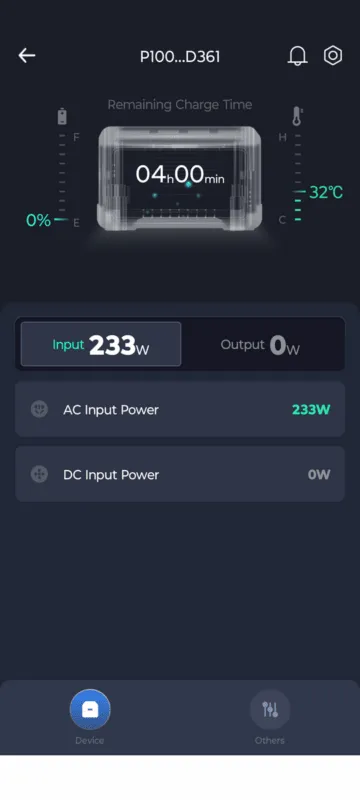
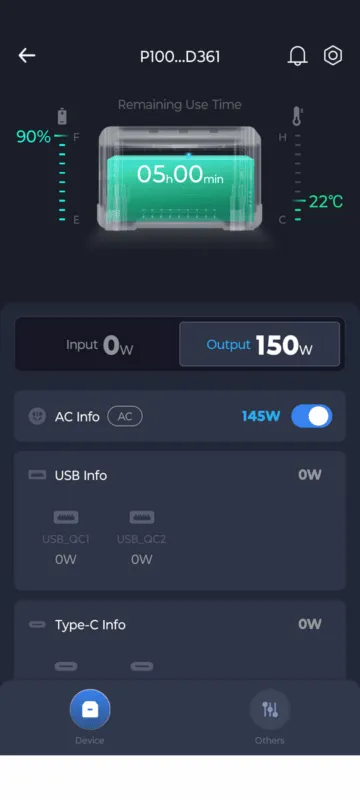
- Approximate remaining battery charge, status – discharging or charging.
- Temperature inside the station. It is not clear which part the temperature sensor tracks. If the app shows 36 degrees, the temperature inside the station is about 2 times higher. This is because the case gets noticeably warm, and warm air comes out of the vents.
- Current load and charging power. The load is split into 2 panels with separate power for 220V outlets and USB ports. You can turn each port on or off remotely, including the light. But controlling the ports is hard. The app does not update info right away, so a port might show as off in the app but actually be active.
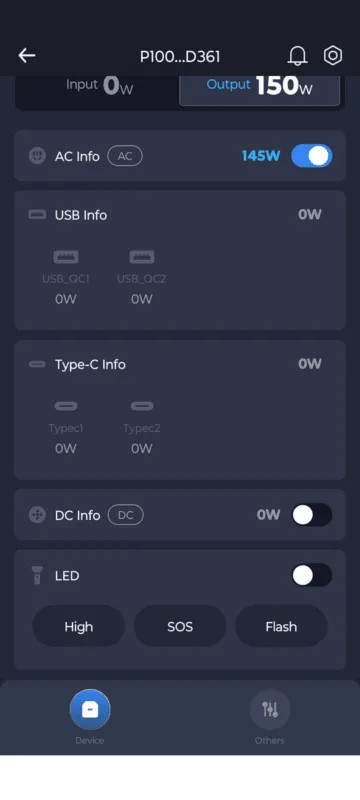
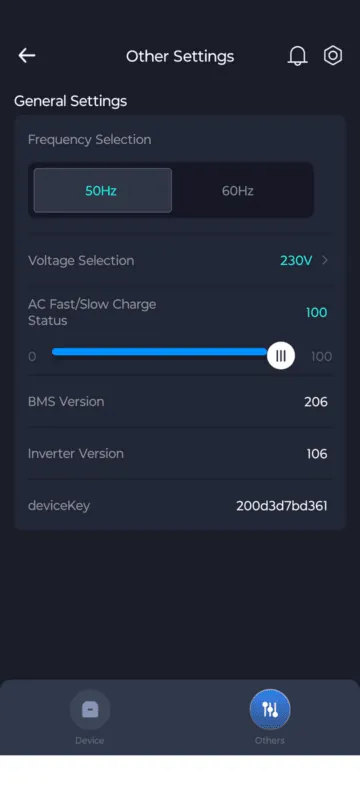
On the second screen, you can find:
- Frequency choice, 50 or 60 Hz.
- Voltage selection for 220V outlets – 220, 230, and 240.
- Manual charging power regulator in %. This works with the switch on the station. For example, if you pick 50, then slow charging will be 250 W, and fast charging will be 600 W. If the station works as a UPS, then the UPS load will add to the charging power.
More details.
According to the manual, most problems are fixed in two ways: a restart or contacting a service center. There are some fixes meant more for repair experts. This is because you cannot diagnose some parts yourself at home.
Main protection settings:
Battery pack protection (BMS)
- Overcharge protection: The process stops when cells reach maximum voltage.
- Under-voltage protection (Under voltage): It turns off the load when the charge drops too low to protect the battery chemistry.
- Over-current discharge protection: It kicks in if you try to power a device that is too strong. Temperature protection:
- From overheating: It stops working if the cell temperature gets too high.
- From overcooling: It stops charging at negative temperatures, which is critical for LiFePO4.
Inverter protection (AC output 220V)
- Short-circuit protection: It turns off right away if the connected device has a short circuit.
- Overload protection (Overload): It kicks in if the power used is more than the rated power, for example, over 600 W.
- Bus voltage protection: It checks the stability of the internal high-voltage circuits.
- Soft start control: It protects against sudden current spikes when you turn on the inverter.
- Frequency deviation protection: It checks the stability of the output signal (50/60 Hz).
- DC offset protection (DC Offset): It stops DC current from getting into the AC output.
System protection and self-diagnosis
- Smart cooling control: It protects against fans stopping or breaking down.
- Communication channel protection: It checks data exchange between boards (BMS, MCU, DSP), and if the connection breaks, the station turns off for safety.
- Measurement sensor control: It checks if current sensors and temperature sensors (NTC) are working right.
- Grid relay protection: It safely switches modes when running on grid power.
- Charging input protection: It checks the input voltage from solar panels or the grid to prevent damage to internal circuits.
Common problems, causes, and solutions:
| The device does not turn on | The battery is fully dead. You did not press the power button long enough. | Charge the device with an AC adapter. Press and hold the power button for 3-5 seconds. |
| No output from AC/DC/USB ports | The output port is not active. Overload protection turned on. You did not connect the cable correctly. | Press the right output button to turn it on. Lower the load on the port. Connect the cables firmly. |
| The device does not charge | The charging cable is broken or not connected. There is a problem with the power source. Overheat protection turned on. | Check the cable connections. Try a different wall outlet or solar panel. Let the device cool down. |
| The display shows an error code | An internal fault or special protection turned on. | Write down the error code (for example, ErXX or FXX) and check the user manual or contact support. |
Error code, fault, and solution:
| F01 | Inverter bus soft start failure | Restart the device. If the error does not go away, contact the service center. |
| F02 | Short circuit at inverter output | Check the output port for a short circuit. Disconnect the load, restart the device, or wait 1 minute for the code to disappear before you turn on the AC button again. |
| F03 | Inverter bus undervoltage error | Restart the device. If the error does not go away, contact the service center. |
| F04 | Inverter bus overvoltage error | Restart the device. If the error does not go away, contact the service center. |
| F05 | Inverter bus short circuit | Restart the device. If the error does not go away, contact the service center. |
| F06 | Inverter output overcurrent | Restart the device. If the error does not go away, contact the service center. |
| F07 | Inverter DC too high | Restart the device. If the error does not go away, contact the service center. |
| F08 | Inverter overheating | 1. Make sure the ambient temperature is within the operating range. 2. Let the device rest for 30 minutes before you turn it on again. |
| F09 | Inverter discharge overcurrent | Restart the device. If the error does not go away, contact the service center. |
| F10 | Inverter charging overcurrent | Restart the device. If the error does not go away, contact the service center. |
| F11 | Inverter current sensor fault | Restart the device. If the error does not go away, contact the service center. |
| F12 | Output voltage or frequency error (above/below normal) | Check if the grid parameters are within the device’s normal operating range. |
| F13 | Continuous AC load short circuit or overload | Check the output port for a short circuit. Disconnect the load, restart the device, or wait 1 minute for the error to reset. |
| F14 | Inverter grid relay fault | Restart the device. If the error does not go away, contact the service center. |
| F15 | Inverter fan fault | Check if the cooling fan rotates normally. |
| F16 | Communication error between the inverter DSP and the main controller (MCU) | Check the correct connection of the communication line between the inverter board and the DC board. |
| F17 | Communication error between the BMS board and the main controller (MCU) | Check the cable connection between the BMS board and the DC board. |
Safety instructions
Manufacturer’s recommendations for safe use of the charging station.
- If there is a fire, use a dry powder fire extinguisher.
- Do not take apart, repair, or change the device.
- Do not put the device near fire and do not expose the station to high temperatures.
- Do not use or store the device in direct sunlight or in high temperatures.
- Do not use or store the device in the bathroom or in places with water or humidity.
- Only use included or approved accessories.
- Keep the station out of reach of children and pets.
- Make sure there is good airflow when you use and charge it.
- Avoid dropping, hitting, or strong shaking the device.
More details.
UPS Mode
In UPS mode, power from the wall outlet bypasses the battery. As soon as the power goes out, a relay switches power to the built-in battery. The bypass feature is important and helps save battery life in UPS mode.
If the battery is low, the input power adds to the power being used. For example, if the station charges at 500 W and the load is 150 W, the total charging power is 650 W. The maximum output power in UPS mode is 1680 W.
The stated switch time is <10 ms. A separate UPS, the EnerGenie EG-UPS-033, beeps when the station’s power turns off and on. A netbook without a battery does not turn off.
Fast charging protocol support for the 100 W USB-C port:
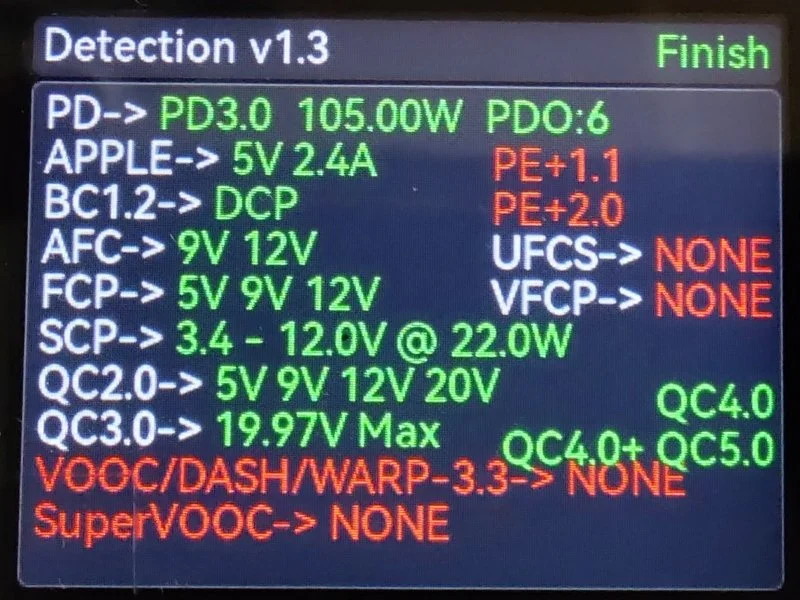
- USB Power Delivery 3.0: 105.00W (PDO: 6 profiles)
- Apple: 5V 2.4A
- USB Battery Charging 1.2: Dedicated Charging Port (DCP)
- Samsung Adaptive Fast Charging (AFC): 9V 12V
- Huawei Fast Charge Protocol (FCP): 5V 9V 12V
- Huawei SuperCharge Protocol (SCP): 3.4 – 12.0V @ 22.0W
- Qualcomm Quick Charge 2.0: 5V 9V 12V 20V
- Qualcomm Quick Charge 3.0: 19.97V Max
- Qualcomm Quick Charge 4.0
- Qualcomm Quick Charge 4.0+ / 5.0
- MediaTek Pump Express+ 1.1
- MediaTek Pump Express+ 2.0
Support for 20W USB-C port fast charging protocols:
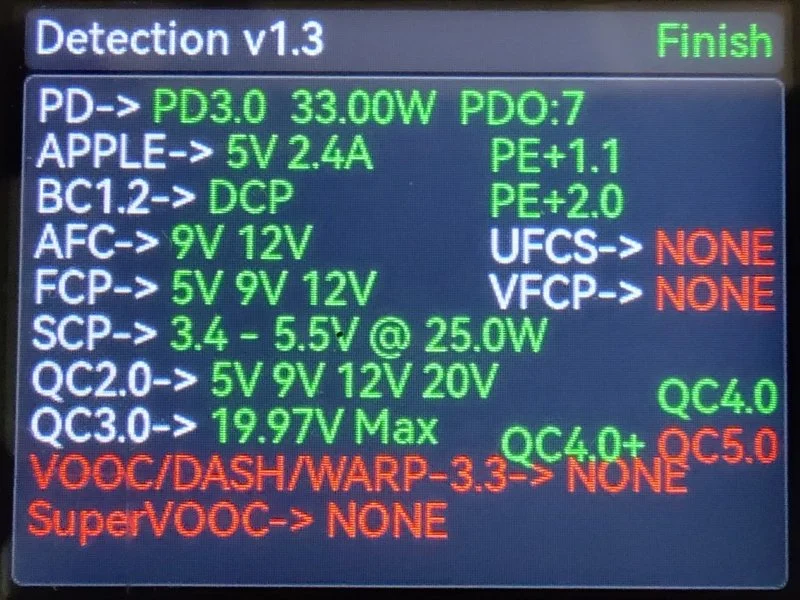
- PD3.0: 33.00W (PDO:7)
- APPLE: 5V 2.4A
- BC1.2: DCP
- AFC: 9V 12V
- FCP: 5V 9V 12V
- SCP: 3.4 – 5.5V @ 25.0W
- QC2.0: 5V 9V 12V 20V
- QC3.0: 19.97V Max
- QC4.0
- QC4.0+
- PE+1.1
- PE+2.0
Supports fast charging protocols for 18W USB-A ports:
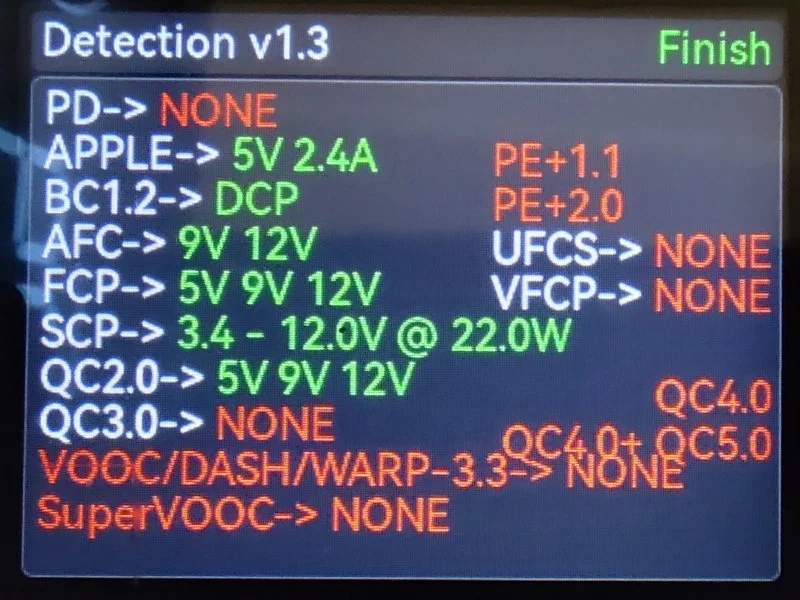
- APPLE: 5V 2.4A
- BC1.2: DCP
- AFC: 9V 12V
- FCP: 5V 9V 12V
- SCP: 3.4 – 5.5V @ 25.0W
- QC2.0: 5V 9V 12V
I checked the fast charging protocols with the FNIRSI FNB58 USB tester.
Important features and sensors:
- Remote control – yes, Wi-Fi and Bluetooth.
- UPS – yes.
- Capacity expansion – no.
- Fast charging – yes, up to 1200W, up to 1700W with solar charging.
- Pure sine wave – yes.
- Wireless charging – no.
- Auto-shutdown – no.
- Fan control – no.
More details.
More details.
Maintenance
A couple of tips to make your charging station last longer:
Operation: stick to the recommended operating temperature range of 32°F – 104°F (32°F – 104°F).
Ventilation: check the station’s vent openings. If needed, remove debris and dust to prevent the station from overheating or shorting out. Do not use the station in wet or dusty places. This is because the built-in fan turns on from time to time to cool it down and can pull debris or dust into the case.
Storage: keep the station in a cool, dry place away from direct sunlight. Avoid very low and high temperatures. The manufacturer’s recommended storage temperature is -50°F – 104°F (14°F – 104°F).
Battery care: if you do not plan to use the station for a long time, recharge the battery every 3-6 months or more often to 50-80%. Do not charge the battery in freezing temperatures. This kind of charging speeds up the chemical breakdown and shortens the battery’s life. Too high temperatures also affect its lifespan.
Cleaning: to clean the station, use a dry, soft cloth. Do not use sprays or compressed air. If the station gets dusty inside, contact a service center for cleaning.
2. ALLPOWERS R1500 LITE 7.25The best charging station for build quality for home use.
The best charging station for build quality for home use and for its price and quality.
The main reason to buy it: it has a 1056 Wh battery and fast charging up to 1200 W with three power levels. It has 4 220V outlets with 1600 W output power, 4 USB ports, and 4 ways to charge the station. Reasons not to buy it: the app is useless. There is no capacity expansion with extra batteries. It is not comfortable to be near the station while it charges and when it has a 200+ W load.
- Battery 1056 Wh, charging up to 1200 W
- 4 AC 220V outlets rated at 1600 W
- 4 USB ports and 4 ways to charge the station
- No capacity expansion
- Noise during charging and loads above 200 W
- Useless app
Learn more.
Learn more.
Learn more.
3. Zendure SuperBase 1000M 6.62The best quiet charging station for home and travel.
Zendure SuperBase 1000M is a charging station with passive cooling, it is a perfect choice if you are looking for a quiet model.
Reasons to buy it: it has the best weight and size among 1 kW stations. It has 2 1000 W outlets and 9 AC ports. It has 4 ways to charge at the same time. The Li-Ion chemistry is more efficient compared to LFP. It has no active cooling, which is perfect for a UPS. Reasons not to buy it: it has low charging power, 100-120 W, or up to 460 W charging through 4 ports. The battery life is 3-5 times shorter compared to LFP.
- Li-Ion chemistry is more efficient compared to LFP.
- It is the best option for a UPS because it has no active cooling.
- It has the best weight in its class at 8.3 kg.
- You can charge it with up to 4 methods at the same time.
- It has 2 220V outlets and 9 DC ports.
- It has low charging power. It is 100-120 W.
- The battery life cycle is 3 to 5 times shorter than popular LFP batteries.
- You should use external cooling for the station in summer and under heavy load.
More details.
More details.
Battery capacity
To check the capacity, I used a 220V smart outlet, the Atorch S1W.
When discharging, I got xxx Wh. The outlet itself uses about 2-3 W of power per hour. So, you should add 20-30 W to the final result. Also, the station discharges down to x%. So, you can potentially get xxx Wh with a full discharge.
From x% to 100%, I got xxxx Wh.
More details.
The maker promises xxxx+ charge-discharge cycles, which is about 10 years of daily use. The batteries are made to discharge down to 90-100% and they do not lose capacity compared to regular Li-Ion batteries.
Battery chemistry for charging stations:
- LCO is almost never used in charging stations; this chemistry is for smartphones and laptops. We included it in the table below to give a full picture.
- NCA is used in portable stations with high energy density (some Jackery and EcoFlow products used NCA cells). Its lifespan is as weak as LCO.
- NMC is a common standard for most mid-range portable stations. It offers a good balance between weight, capacity, and price with a decent lifespan.
- LFP is the best choice for home and good portable stations. EcoFlow DELTA Pro, Bluetti AC300, Anker SOLIX, and other premium models use it. It has high safety and an honest lifespan of 3000+ cycles.
- LTO is a niche industrial chemistry. It has a great lifespan and temperature range, but low energy density and high cost make it not practical for home stations.
- Na-Ion is a fast-growing technology, and its cycle range is wider than batteries with other chemistries. Different makers test under different conditions: discharge depth, temperature, and charge speed. So, the results vary. 2,000+ cycles are for commercial cells based on layered oxides. Up to 10,000+ cycles are for advanced PBA cells and developments from CATL Naxtra.
| LCO (Lithium-cobalt) | 500–1,000 (Low) | ~1,4–2,7 | 150–200 (High, but unstable) | Charge: 32°F to +113°F. Discharge: -68°F to +140°F. Thermal breakdown at ~302°F |
| NCA (Nickel-cobalt-aluminum) | 500–1,000 (Low) | ~1,4–2,7 | 200–260 (Best among commercial types) | Charge: 32°F to +113°F. Discharge: -68°F to +131°F. Thermal breakdown at ~482°F |
| NMC (Nickel-manganese-cobalt) | 1,000–2,000 (Medium) | ~2,7–5,5 | 150–250 (Advanced up to 300+) | Charge: 32°F to +113°F. Discharge: -68°F to +131°F. Best at 68-104°F |
| LFP / LiFePO4 (Lithium-iron-phosphate) | 3,000–6,000 (High) | ~8–16 | 90–205 (Typically 120–160) | Charge: 32°F to +122°F. Discharge: -68°F to +140°F. Most safe |
| LTO (Lithium-titanate) | 10,000–30,000 (Extreme) | ~27–82 | 50–80 (Lowest density) | Charge: -104°F to +122°F. Discharge: -104°F to +167°F. Best temp. range |
| Na-Ion (Sodium-ion) | 2,000–10,000+ (Developing) | ~5,5–27+ | 100–175 (Typically 120–160) | Charge: 32°F to +113°F. Discharge: -104°F to +140°F. Store at 0 V |
Explanation for the table: cycles are shown until the battery reaches about 80% of its first capacity under normal conditions (77°F, full discharge depth). The real lifespan depends on discharge depth, temperature, and charging mode. We calculate the lifespan by dividing the number of cycles by 365 days.
More details.
The front panel has four 220/240V outlets.
Main specs:
- Continuous power: xxx W.
- Peak power: xxxx W.
More details.
DC output
Total: 9 ports, powering up to 9 devices at the same time.
Three USB-A ports: 5V / 2.4A, 30W total.
One USB-C PD port: 100W (input/output).
One car charger port: 12.6V / 10A, 126W max.
Two DC5521 ports: 12V / 6A, dual mode 12.6V / 10A, 126W max.
On the front of the station, you will find X blocks with DC ports:
Block 1: car cigarette lighter.
- Cigarette lighter: 12 V, 10 A (max. 120 W).
Block 2: four USB ports – 2 USB-C and 2 USB-A.
- USB-C (2 ports): Up to 100W each – 200W max.
- USB-A (2 ports): Up to 18W each – 36W max.
More details.
On the left side, there is a panel for charging the station.
List from left to right:
A universal C14 connector, like on a computer power supply or a monitor, for charging through a 220/240V outlet.
An automatic fuse button. If a power surge or overload happens during charging, this button will ‘pop out’ to protect the station’s internal parts.
XT60 connector. A universal input for DC charging through:
Car cigarette lighter. (cable is not included).
Solar panel (you need a special MC4 -> XT60 cable).
Main input power specs:
Input (station charging)
- Outlet: 220–240V, max current 5.5A. There are three charging modes: 400, 800, and 1200W. The charging time is about 3 hours, 2 hours, and 1.5 hours, respectively.
- Solar panels: 12–95V, up to 13A, max power 650W.
- Car: 12V / 24V DC.
Temperature range (Important!)
- Charging: 32°F to 104°F. You cannot charge it in freezing weather. When you charge it, irreversible chemical processes will start in the battery, which makes it fail faster.
- Discharging (use): from -50°F to 104°F.
More details.
More details.
Icon meanings on the screen:
Control buttons:
More details.
| The unit does not turn on. | The battery is fully dead. | Plug it into AC power and charge it for at least 30 minutes before turning it on. |
| The AC output does not work. | The output is not on, or overload protection turned on. | Press the ‘AC’ button to turn it on. Lower the total power use of connected devices. |
| The device does not charge | Bad connection; bad adapter; extreme temperature. | Check that connections are secure. Try a different outlet or adapter. Move the device to a place between 32-104°F. |
| The display shows an error code | Internal system error. | Write down the error code and contact customer support for help. |
| The station does not turn on, and the outputs do not work. | Make sure the station is in the right temperature range. Unplug all electrical devices, charge the SuperBase for 5–10 minutes, and turn it on again. |
| You can turn on the station, but one or more outputs do not work. | Make sure the station is charged. Check all output ports: make sure they are not blocked and there is no short circuit. Unplug all external devices, turn off the station, turn it on, and try to connect the devices again. Try connecting the external device to another power source to make sure it works. |
| The station turns off suddenly during use. | The internal protection system turns off the station if it overcharges or undercharges, gets too hot or cold, overloads, or short circuits. Unplug all electrical equipment, make sure the room temperature is right, and charge the station for 5–10 minutes. Before you plug things in again, make sure the equipment works. |
| The station does not charge. | Make sure the charger’s specs match the station’s specs. Make sure the room temperature is in the right range. |
| Strange (unclear) numbers appear on the display. | If you press the DC/USB/AC/LED button three times in a row, the screen will show the current firmware version number. The display will go back to normal mode after 3 seconds. This does not affect how the device works. |
More details.
Fast charging protocol support for USB-C ports:
Support for fast charging protocols on USB-A ports:
I checked the fast charging protocols with the FNIRSI FNB58 USB tester.
Important features and sensors:
- Remote control – no.
- UPS – yes.
- Capacity expansion – no.
- Fast charging – yes, up to 460W.
- Pure sine wave – yes.
- Wireless charging – no.
- Auto-shutdown – no.
- Fan control – no, only passive cooling.
More details.
4. CTOLITY AP400 5.72This is the best affordable charging station.
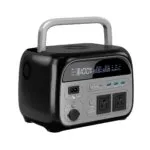
This is the best affordable charging station under $350, and it is the best choice if you want to save money.
Reasons to buy: It has a 345 Wh battery and up to 600 W output power. It has 5 connection ports, a UPS function, a flashlight, and 11 fast charging ports. Reasons not to buy: It has low inverter efficiency at 65%. The station’s charging power is up to 150W. It has noisy fans.
- 345 Wh LPO battery, 500 W output power
- 5 types of ports for connecting electronics
- It has a UPS mode, 11 fast charging protocols, a flashlight, and 8 protection settings.
- Low inverter efficiency – 65%. The station gives out 216 Wh.
- 150 W charging power
- Noisy fans when charging or in UPS mode
More details.
More details.
Battery capacity
To check the capacity, I used a 220V smart outlet, the Atorch S1W.
When discharging, I got xxx Wh. The outlet itself uses about 2-3 W of power per hour. So, you should add 20-30 W to the final result. Also, the station discharges down to x%. So, you can potentially get xxx Wh with a full discharge.
From x% to 100%, I got xxxx Wh.
More details.
The maker promises xxxx+ charge-discharge cycles, which is about 10 years of daily use. The batteries are made to discharge down to 90-100% and they do not lose capacity compared to regular Li-Ion batteries.
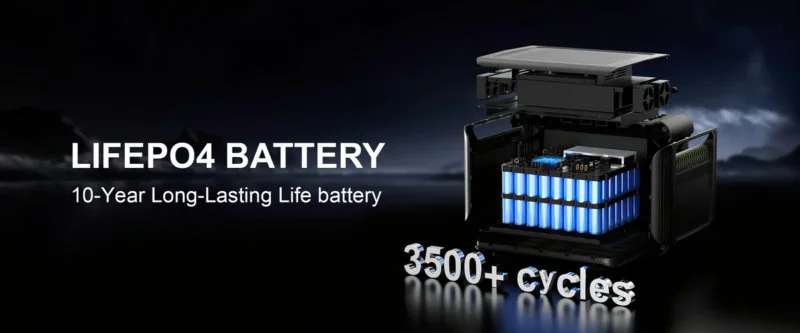
Battery chemistry for charging stations:
- LCO is almost never used in charging stations; this chemistry is for smartphones and laptops. We included it in the table below to give a full picture.
- NCA is used in portable stations with high energy density (some Jackery and EcoFlow products used NCA cells). Its lifespan is as weak as LCO.
- NMC is a common standard for most mid-range portable stations. It offers a good balance between weight, capacity, and price with a decent lifespan.
- LFP is the best choice for home and good portable stations. EcoFlow DELTA Pro, Bluetti AC300, Anker SOLIX, and other premium models use it. It has high safety and an honest lifespan of 3000+ cycles.
- LTO is a niche industrial chemistry. It has a great lifespan and temperature range, but low energy density and high cost make it not practical for home stations.
- Na-Ion is a fast-growing technology, and its cycle range is wider than batteries with other chemistries. Different makers test under different conditions: discharge depth, temperature, and charge speed. So, the results vary. 2,000+ cycles are for commercial cells based on layered oxides. Up to 10,000+ cycles are for advanced PBA cells and developments from CATL Naxtra.
| LCO (Lithium-cobalt) | 500–1,000 (Low) | ~1,4–2,7 | 150–200 (High, but unstable) | Charge: 32°F to +113°F. Discharge: -68°F to +140°F. Thermal breakdown at ~302°F |
| NCA (Nickel-cobalt-aluminum) | 500–1,000 (Low) | ~1,4–2,7 | 200–260 (Best among commercial types) | Charge: 32°F to +113°F. Discharge: -68°F to +131°F. Thermal breakdown at ~482°F |
| NMC (Nickel-manganese-cobalt) | 1,000–2,000 (Medium) | ~2,7–5,5 | 150–250 (Advanced up to 300+) | Charge: 32°F to +113°F. Discharge: -68°F to +131°F. Best at 68-104°F |
| LFP / LiFePO4 (Lithium-iron-phosphate) | 3,000–6,000 (High) | ~8–16 | 90–205 (Typically 120–160) | Charge: 32°F to +122°F. Discharge: -68°F to +140°F. Most safe |
| LTO (Lithium-titanate) | 10,000–30,000 (Extreme) | ~27–82 | 50–80 (Lowest density) | Charge: -104°F to +122°F. Discharge: -104°F to +167°F. Best temp. range |
| Na-Ion (Sodium-ion) | 2,000–10,000+ (Developing) | ~5,5–27+ | 100–175 (Typically 120–160) | Charge: 32°F to +113°F. Discharge: -104°F to +140°F. Store at 0 V |
Explanation for the table: cycles are shown until the battery reaches about 80% of its first capacity under normal conditions (77°F, full discharge depth). The real lifespan depends on discharge depth, temperature, and charging mode. We calculate the lifespan by dividing the number of cycles by 365 days.
More details.
The front panel has four 220/240V outlets.
Main specs:
- Continuous power: xxx W.
- Peak power: xxxx W.
More details.
On the front of the station, you will find X blocks with DC ports:
Block 1: car cigarette lighter.
- Cigarette lighter: 12 V, 10 A (max. 120 W).
Block 2: four USB ports – 2 USB-C and 2 USB-A.
- USB-C (2 ports): Up to 100W each – 200W max.
- USB-A (2 ports): Up to 18W each – 36W max.
More details.
On the left side, there is a panel for charging the station.
List from left to right:
A universal C14 connector, like on a computer power supply or a monitor, for charging through a 220/240V outlet.
An automatic fuse button. If a power surge or overload happens during charging, this button will ‘pop out’ to protect the station’s internal parts.
XT60 connector. A universal input for DC charging through:
Car cigarette lighter. (cable is not included).
Solar panel (you need a special MC4 -> XT60 cable).
Main input power specs:
Input (station charging)
- Outlet: 220–240V, max current 5.5A. There are three charging modes: 400, 800, and 1200W. The charging time is about 3 hours, 2 hours, and 1.5 hours, respectively.
- Solar panels: 12–95V, up to 13A, max power 650W.
- Car: 12V / 24V DC.
Temperature range (Important!)
- Charging: 32°F to 104°F. You cannot charge it in freezing weather. When you charge it, irreversible chemical processes will start in the battery, which makes it fail faster.
- Discharging (use): from -50°F to 104°F.
More details.
More details.
Icon meanings on the screen:
Control buttons:
More details.
List of protections
Based on the error codes from the manual, we can find these types of protection in the charging station:
Communication system protection: It checks data exchange between main parts (BMS, inverter, and control panel). This stops the station from working if there is a software error or a broken internal cable.
Charging process protection: It checks the current going into the station, to avoid damaging the batteries if the external power supply is faulty.
Temperature protection:
- Low temperature protection: It stops charging or using lithium cells in cold weather, which is very important for how long they last.
- Sensor control (NTC): The station checks if the thermistors themselves are working right, so it does not become ‘blind’ if they break.
Voltage protection:
- Against too low voltage (Under voltage): It protects the battery from deep discharge, which can make the cells stop working.
- Against overvoltage (Overvoltage): It cuts off power, if the voltage goes above a safe limit.
Current and load protection:
- Against overload (Overload): It turns on if you plug in a device that needs more power than the station can give (for example, more than 600 W).
- Against short circuit: It instantly turns off if the connected device has a short circuit.
- Battery system protection (BMS): It generally checks the cell status (balancing, chemical health).
Error codes:
| Er01 | BMS communication timeout |
| Er02 | Inverter communication timeout |
| Er03 | Charging process protection |
| Er04 | Low temperature protection |
| Er05 | Too low voltage protection |
| Er06 | Overvoltage protection |
| Er07 | Overload protection |
| Er08 | Short circuit protection |
| Er09 | NTC (temperature sensor) error |
| Er0A | BMS error |
Troubleshooting:
Er01: Check the connection of the communication line between the BMS and the control panel, or check for other communication failure reasons.
Er02: Check the communication lines between the inverter and the main control board, or check for other communication failure reasons.
Er03: 1) Wait for the BMS and inverter high temperature protection to clear; 2) Charge the device after it discharges.
Er04: Wait for the BMS low temperature protection to clear.
Er05: Charge the device to refill its energy, or fix hardware problems with the inverter.
Er06: Discharge the device, or fix MPPT input voltage problems and inverter hardware errors.
Er07: Wait for it to cool down before restarting, or fix hardware problems with the inverter.
Er08: Fix hardware problems, short circuit protection, and restart.
Er09: NTC (temperature sensor) failure.
Er0A: Charging or discharging process error.
Sometimes, turning the station off and on again will help.
More details.
USB-C port fast charging protocol support:
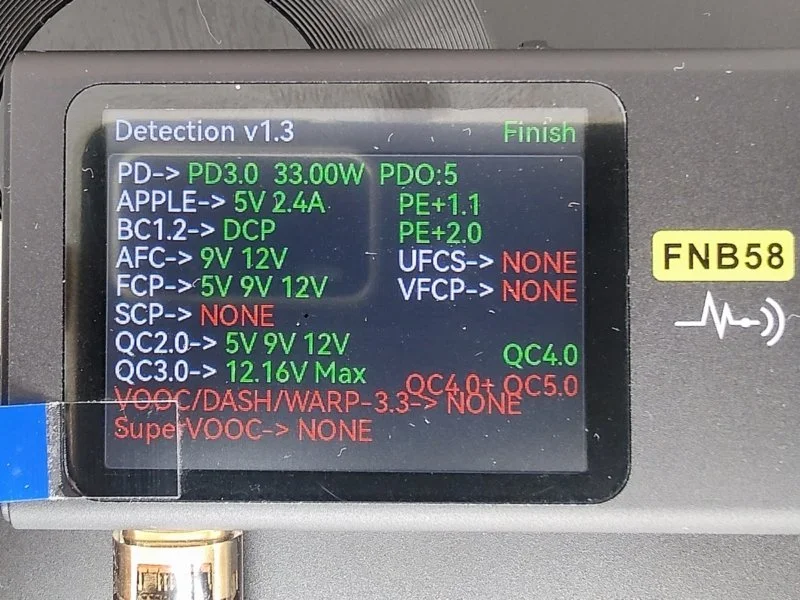
- USB Power Delivery: PD3.0 up to 33.00 W
- Apple: 5V 2.4A
- Battery Charging 1.2: DCP
- Adaptive Fast Charging: 9V, 12V
- HiSilicon Fast Charge Protocol: 5V, 9V, 12V
- Qualcomm Quick Charge 2.0: 5V, 9V, 12V
- Qualcomm Quick Charge 3.0: up to 12.16V Max
- Pump Express+ 1.1
- Pump Express+ 2.0
- Qualcomm Quick Charge 4.0
Support for fast charging protocols on USB-A ports:
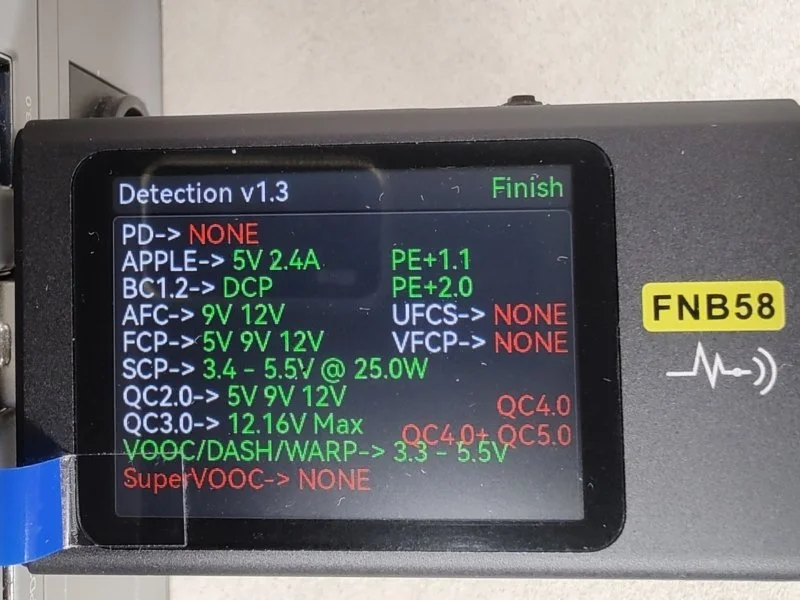
One interesting thing is support for VOOC/DASH/WARP protocols. This is very rare in chargers. I cannot check how the codecs work.
- Apple: 5V 2.4A
- Battery Charging 1.2: DCP
- Adaptive Fast Charging: 9V 12V
- HiSilicon Fast Charge Protocol: 5V 9V 12V
- HiSilicon SuperCharge Protocol: 3.4 – 5.5V @ 25.0W
- Qualcomm Quick Charge 2.0: 5V 9V 12V
- Qualcomm Quick Charge 3.0: 12.16V Max
- VOOC/DASH/WARP: 3.3 – 5.5V
- Pump Express+ 1.1
- Pump Express+ 2.0
I checked the fast charging protocols with the FNIRSI FNB58 USB tester.
The flashlight has 3 modes: half brightness, full brightness, and blinking.
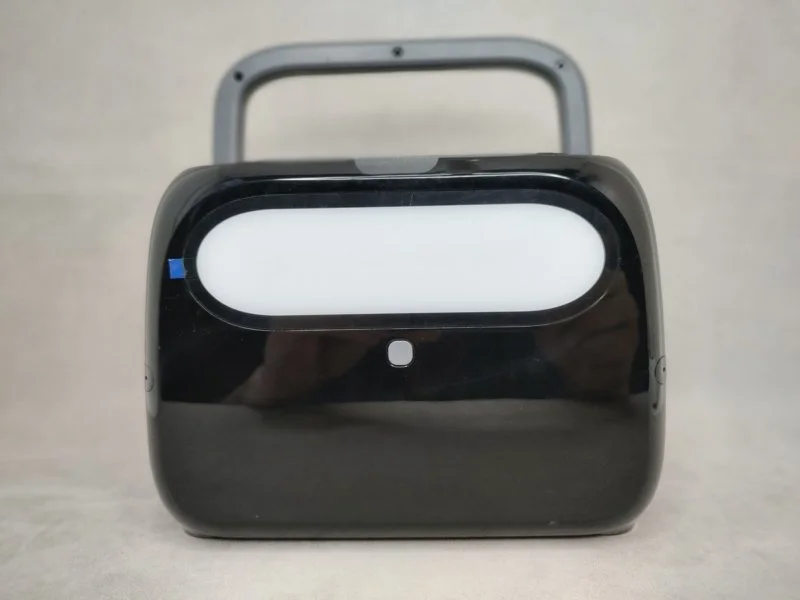
Important features and sensors:
- Remote control – no.
- UPS – yes.
- Capacity expansion – no.
- Fast charging: no.
- Pure sine wave – yes.
- Wireless charging: 1 pad.
- Sleep timer: no.
- Fan control – no.